
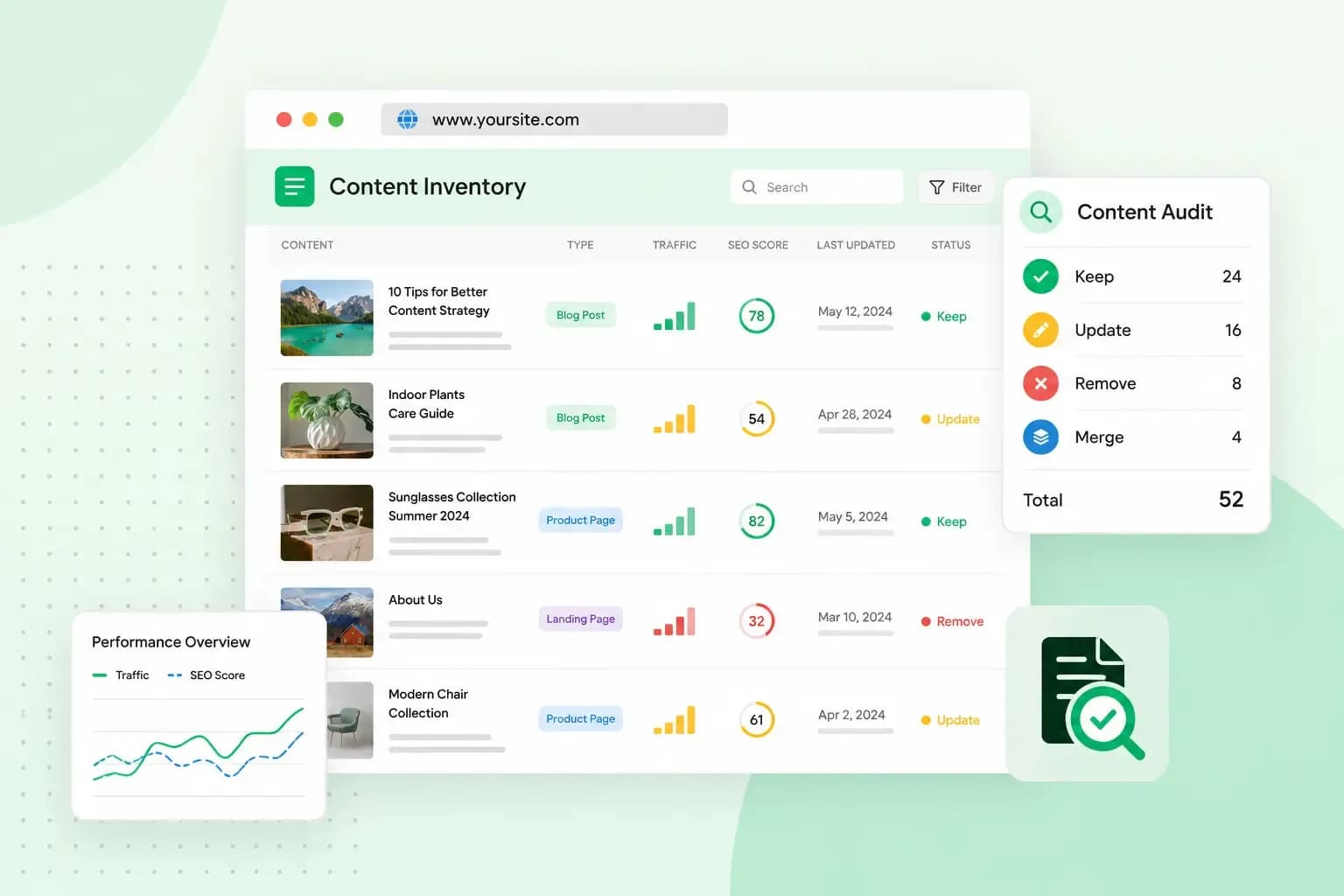
A content audit is a review of the pages on your website, one by one, to see which still do their job and which don't. You look at each page's figures, such as search clicks and visits, and you read the page itself. Then you decide what to do with it: keep it, update it, merge it with another page or remove it.
A website content audit starts with a list of your pages, called a content inventory. It ends with a plan for which pages to work on first.
What a content audit shows you
The benefits of a content audit come from seeing all your pages side by side, with the same figures for each.
- The pages that bring in visitors, enquiries or sales stand out, so you know which ones to build on.
- Pages that are slipping or out of date, with old prices, products you no longer sell or advice that has changed, get a clear place on your to-do list.
- Content that's no longer relevant to your business shows up, so you can take it off your site.
- Gaps come to light: topics your visitors look for that none of your pages covers yet. Google Search Console shows which searches your site appears for, so look there for searches that no page of yours really answers.
- Pages that leave a visitor's question unanswered show up, so you can answer it on the page itself. Our guides on website user experience and boosting conversions show how.
- The figures you collect become your baseline, so you can compare new figures with them after each change.
How to do a content audit
Before you start, you need a spreadsheet, access to your website's data and time to read your own pages.
- Decide what the audit covers: the whole site, or one part, such as the blog or your service pages. Decide what you want to find out too, for example which pages could bring in more visitors from search.
- List every page you audit in one spreadsheet, with a row per page and a column for each detail you'll judge it on.
- Collect the same figures for every page, over the same period.
- Read each page and check which reader it serves, and whether it gives that reader a clear answer to their question.
- Give every page an action: keep, update, merge or remove. A page you merge or remove gets a 301 redirect to the closest live page.
- Work through the list, starting with the pages that get the most impressions but don't yet do as well as they could.
What to put in your content audit spreadsheet
This spreadsheet is your content inventory. You don't need a ready-made content audit template, as a blank sheet in Microsoft Excel or Google Sheets does the job. Give it these columns:
- URL: the page's address, the URL you'll match with its figures later.
- Title: the page's title, so you recognise each row at a glance.
- Type of content: whether the page is a blog post, a product page, a service page or a help article.
- Published and last updated: both dates, to find the pages nobody has touched in a long time.
- Word count: the number of words on the page, to spot very short pages that may not answer much.
- Meta description: a copy of the short summary you wrote for search results. Check that it still matches the page.
- Main keyword: the search term the page should be found for. If you haven't chosen keywords for your pages yet, do that before you fill in this column.
- Figures and action: a column for each figure from the next section, and one for the action you decide on.
To fill in the URLs, start from your sitemap, which lists the pages of your site. On a bigger site, a crawler such as Screaming Frog can build the list for you. A crawler is a program that finds and scans the pages of your site automatically, so you get them as a list.
Which figures to collect, and where to find them
Pick the figures that match your goal, plus the views of each page. An SEO content audit aims at more visitors from search, so it starts with the search figures. When you want more enquiries, look at what visitors do on the page.
| Figure | What it tells you | Where you find it |
|---|---|---|
| Clicks and impressions | How often the page appeared in Google's results, and how often someone clicked through to it | Google Search Console, Performance report |
| Click-through rate (CTR) | The share of impressions that became a click. A low rate on a page that shows up often can mean the title doesn't tempt people | Google Search Console |
| Average position | Roughly where the page ranks in Google for the searches it shows up for | Google Search Console |
| Views | How many times visitors saw the page, with repeat views counted | Google Analytics, Pages and screens report |
| Average engagement time | How long visitors actively spent on the page | Google Analytics, for example the Pages and screens report |
| Bounce rate | The share of visits that weren't engaged: 10 seconds or shorter, with no key event and only one page viewed | Google Analytics. Most reports don't show it by default, so if you're an Editor or Administrator, customise a report, such as Pages and screens, to add it. If you can't, use average engagement time instead |
| Key events | Whether the page leads to what you want, such as clicks on a CTA, a newsletter sign-up or a purchase | Google Analytics |
| Backlinks | The number of other websites that link to the page. Backlinks help people and search engines find it | Google Search Console, Links report, or an SEO tool for more detail |
On a small website, you can run the audit with three content audit tools: Google Search Console, Google Analytics and a spreadsheet. Both Google tools are free.
How to check the quality of a page
Figures tell you how a page performs, not why. For that, read each page as a visitor would and check these points:
- Look for prices, product names, dates and advice that have changed since you published the page.
- Check that a visitor finds the answer near the top, not after a long introduction.
- Read it for tone: it should sound like your business.
- Keep paragraphs short, headings clear and words plain. Images need alt text, so visitors with screen readers can follow the page too.
- Give each page a next step, such as a contact form, a product or a related article.
Keep, update, merge or remove: what to do with each page
Put the figures and your notes side by side, and give each page its action.
| Action | When it fits | What you do |
|---|---|---|
| Keep | The page performs well and its content is correct | Leave it as it is, and use it as a model for new pages |
| Update | The page gets impressions or visits but is outdated, too thin or doesn't answer its question well | Correct the facts, add what's missing and improve the title and meta description |
| Merge | Several pages cover the same topic and none of them does it well | Combine them into one stronger page and redirect the others to it |
| Remove | The page is outdated, gets no visits and isn't worth updating | Delete it and redirect its address to the closest page that's still live, such as the section page it belonged to |
When you're not sure, update rather than remove. Don't delete a page that already gets impressions or has links from other websites.
A 301 redirect sends anyone who opens the old address to the page that replaces it. Google recommends a permanent redirect like this when a page's address changes for good, because it gets both visitors and Google to the right page.
Which pages to fix first
Start with the pages that get the most impressions or visits but don't perform as well as they could. A page that shows up often in Google but rarely gets a click is a good first candidate, because a better title alone can help. After that, turn to important pages nobody finds, such as a service page with hardly any visits.
Put the updates, and the new pages your gaps call for, in a content calendar, and work through them in small steps. Note the date of each change, then compare the figures with your baseline after a few weeks.
Keeping pages up to date for search is ongoing work. Our SEO services start with a short talk about your business, followed by a full audit of your content, structure and technical setup. After that, our team keeps improving your website and reports on the progress every month.
Our SEO team reviews your website and improves it for you.
Book a free consultationCommon questions about content audits
How often should you do a content audit?
A full audit once a year works well for a small business website, with a quick check of your busiest pages in between. Plan an extra one before you redesign your website or move it to another system, and when your visits drop without an obvious reason.
How long does a content audit take?
Count the pages you plan to audit, and note how long it has been since your last audit, before you set aside the time for it. Time your first few pages to see how quickly you work, then plan the rest. Give yourself a time limit and audit one part at a time, such as the blog first and the product pages after that.
Start with your sitemap and the part of your site that matters most to your business, and work through it page by page. For the search side, you can also get help from our SEO team.
Recommended reading
 Marketing19 Oct 2026
15 ideas for Black Friday marketing
Make the most of Black Friday with 15 marketing ideas to attract customers and boost sales. Discover ways to promote your offers, reach more shoppers and make your campaign stand out. Marketing30 Dec 2025
AI SEO: how to use AI for search engine optimisation
A basic guide to AI in SEO – let's look at how artificial intelligence can help you speed up your SEO tasks. Marketing30 Dec 2025
AI search optimisation: how to get your website into AI answers
A basic guide to AI in SEO – let's look at how artificial intelligence can help you speed up your SEO tasks.