
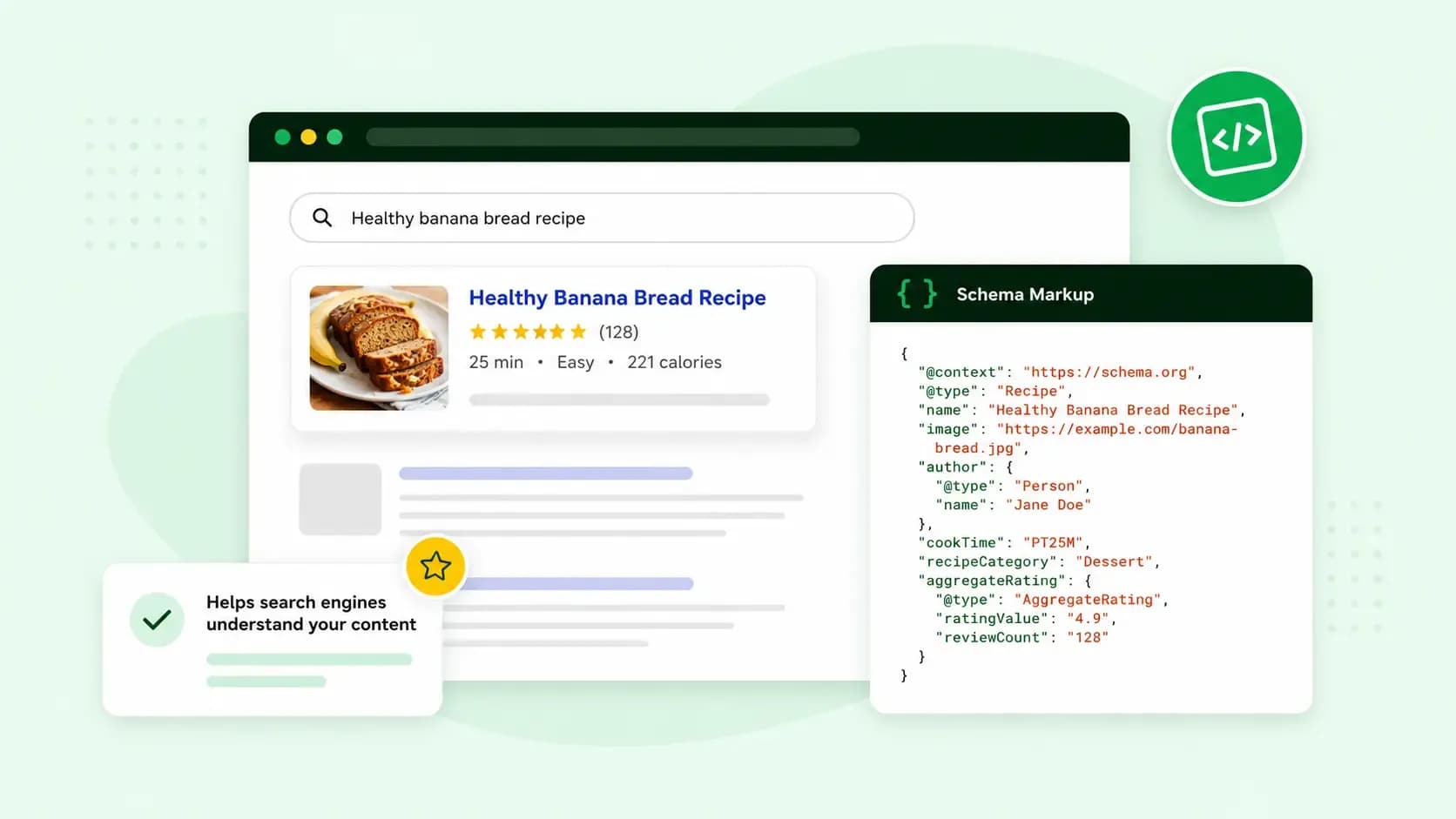
Schema markup is code you add to a web page to tell search engines what its content is. That can be a product and its price, a review score or the date of an event. For you, it means Google can read your page more precisely and show extra details about it in search results. On your shoe shop's product page, for example, it can tell Google which number is the price and whether the shoes are in stock.
How does schema markup work?
Schema markup works by putting a label on each piece of information on your page. If your product page shows a 3 next to a pair of shoes, a visitor can tell from the page whether that's the size or the number of pairs left. To a search engine, it can be just a number. A label in the markup settles it: this 3 is the number of pairs you have left in stock.
The labels come from schema.org, a vocabulary of types and properties founded by Google, Microsoft, Yahoo and Yandex. A type says what something is, such as a product, an event or a local business. Its properties describe it, so a product has a name, a price and an availability. Google asks you to use the type and property names schema.org defines, so you'll often see schema markup and structured data used for the same thing.
You can write the markup in three formats: JSON-LD, Microdata and RDFa. Google recommends JSON-LD where your site allows it, because it's the easiest to add and maintain. A JSON-LD block sits on the page apart from the text your visitors read, so you don't have to touch the page's layout. For your shoes, it holds labels such as price, priceCurrency and availability, each with its value, such as GBP or InStock.
What are rich snippets?
Rich snippets are search results with extra details beyond the usual title, link and description. Think of star ratings under a recipe, the price and stock of a product, or the dates of upcoming events. Google calls them rich results. Schema markup is what makes your page eligible for one, because those details come from the labels in your code.
Rich results are where you see the benefits of schema markup. When Google understands the data on your page better, it can show your result more attractively and in new ways.
Does schema markup help SEO?
Yes, mainly through rich results. Schema markup helps Google understand your page and can earn your listing those extra details. That makes it a useful part of your search engine optimisation (SEO). It doesn't guarantee them, though: even when your markup is correct according to the Rich Results Test, Google doesn't promise to show your structured data in search results. Google also tailors each results page to the searcher, so a rich result may not appear every time.
To keep your page eligible, follow Google's guidelines. Include every required property of the type you use. Only mark up information your visitors can see on the page, and leave out hidden information, even if it's accurate. A page that breaks the rules can lose its eligibility for rich results. According to Google, losing that eligibility doesn't affect how the page ranks in web search.
Types of schema markup for a small business website
These are the types that fit a small business website:
- Organization: your logo, name, address and contact details. They can show up in a knowledge panel, the box of information Google can show when someone searches for your business.
- Local business: your opening hours and directions, for a business with a physical address your customers visit in person.
- Product: the price, availability and review ratings of something you sell. It's the type behind your shoe shop's price and stock details.
- Review snippet: a short excerpt of a review or an average rating. It works for products, recipes, books, films and software, and for local businesses only on a site that collects reviews of other local businesses, not your own.
- Event: concerts, workshops and other events people can attend at a set time and place, shown as a list in search.
- Article: a news, sports or blog article, with its title and larger images in the result.
- Breadcrumb: the navigation path that shows where a page sits in your site's structure.
You don't need all seven. Start with Organization, then add Local business if customers visit you and Product if you sell online. Those two or three schema markups are a good start.
Google changes the structured data features it supports from time to time. FAQ rich results stopped appearing in Google Search in May 2026. Several less-used types, such as course info and vehicle listings, are no longer shown either. Check Google's list of structured data features before you start, so you only add markup that can still show up.
How to add schema markup to your website
You don't have to write the code by hand. On any website where you can edit the page code, Google's Structured Data Markup Helper builds it from the page itself:
- Open Google's Structured Data Markup Helper and select the Website tab.
- Choose the type of page you are marking up, for example an event page.
- Enter the URL of the page or its HTML. The page must open for anyone without logging in.
- Select Start Tagging, highlight the important parts of the page and pick what each one is, such as the start time of an event. Tag every value the type requires.
- Select Create HTML and keep the default format, JSON-LD.
- Copy the generated JSON-LD code and paste it into the body of your page.
- Test the code by pasting it into Google's Rich Results Test, which lists any required field that is missing.
Where you paste the code depends on how you edit your site. If you use a website builder or a content management system (CMS) and can't edit the page code, check whether it has a setting or a plugin that adds structured data for you. If you edit the page's source code, paste it anywhere in the page's body, between the opening and closing body tags.
If your site runs on WordPress, an SEO plugin is usually the simpler route, because it needs no coding. Rank Math PRO, which you can get from us, has a tailored schema markup generator that builds the code from the details you fill in, and it validates the markup with Google. Rank Math PRO is a paid plugin. Rank Math also has a limited free version without some of the PRO features.
Rank Math PRO adds schema markup to your WordPress site, with no coding required.
Get Rank Math PROHow to check your schema markup
Test your markup before you publish it, and keep an eye on it once it's live.
- Google's Rich Results Test shows which rich results your page or code can get. For some types, it previews how the result could look.
- The Schema Markup Validator from schema.org checks the syntax of any schema.org markup against the standard.
- The rich result reports in Google Search Console show which pages on your live site have valid markup and which have errors. Markup can break after it goes live, and these reports are where you see it.
Before Google uses the new code, it has to crawl and index your page again: visit it, read the new version and store it. That can take a few weeks. If you're an owner or full user of your property in Search Console, you can use URL inspection to ask Google to crawl the page again, though that doesn't guarantee the page reaches search results soon, or at all. If the data is complete and correct, your page can then appear as a rich result.
Once your first page passes the Rich Results Test, do the same for your other key pages. If your site runs on WordPress, you can set up Rank Math PRO and add the markup to each new page without writing code.
Recommended reading
 Marketing19 Oct 2026
15 ideas for Black Friday marketing
Make the most of Black Friday with 15 marketing ideas to attract customers and boost sales. Discover ways to promote your offers, reach more shoppers and make your campaign stand out. Marketing30 Dec 2025
AI SEO: a guide to search engine optimisation with artificial intelligence
A basic guide to AI in SEO – let's look at how artificial intelligence can help you speed up your SEO tasks. Marketing30 Dec 2025
Make your website visible in AI searches
A basic guide to AI in SEO – let's look at how artificial intelligence can help you speed up your SEO tasks.