
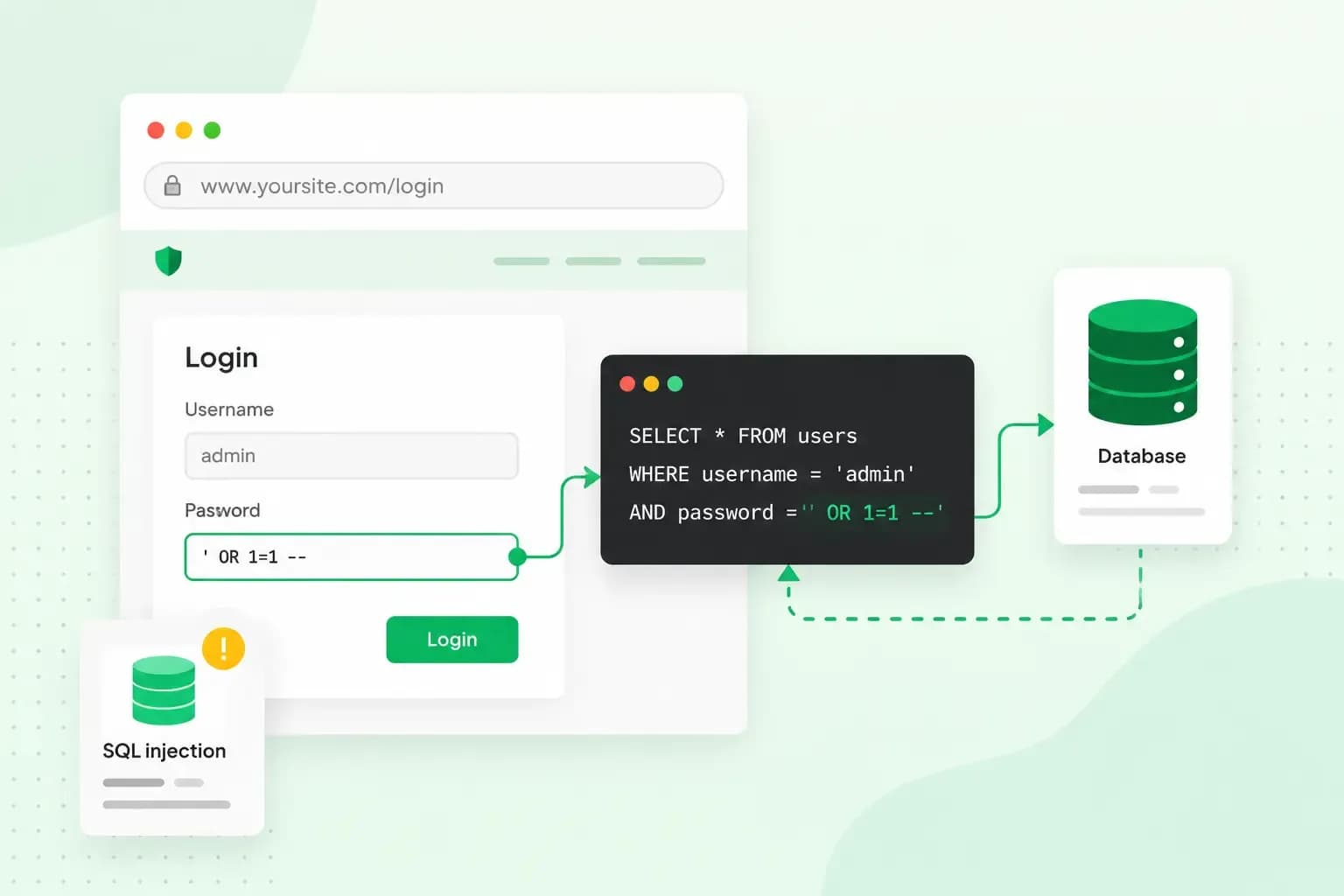
SQL injection (SQLi) is an attack where someone types database commands into a form or web address on your website. Your database then runs them as if they were part of your own code. That can let the attacker read, change or delete data they should never get at, such as your customers' names, addresses and passwords.
It happens when a website pastes what a visitor types straight into a database query. That also means you can prevent it, because the main fix lies in how your website's code builds those queries.
How does a SQL injection attack work?
A SQL injection attack works by turning what a visitor types into part of a database query. A website with customer accounts, orders or a search box keeps that information in a database and asks for it in SQL, short for Structured Query Language. Each request is called a query, such as "show me the order with this number".
Some websites build that query by gluing whatever a visitor types into the query text. The database then reads the visitor's input as part of the query itself. So if an attacker types a piece of SQL instead of an order number, they change what the query asks for. This pasting of input is the root cause of SQL injection.
You'll find these weak spots wherever your website passes input on to its database. Login forms, search boxes, order lookups and web addresses that carry a value are the usual places.
A SQL injection example
Imagine you sell candles through your own online shop at hollybrookcandles.co.uk. Your customers check an order by typing their order number and surname, and your website then sends the database this query:
SELECT * FROM orders WHERE order_number = '1042' AND surname = 'Patel'Both values come straight from the form. Now an attacker enters this as the order number and leaves the surname empty:
1042'--The query becomes:
SELECT * FROM orders WHERE order_number = '1042'--' AND surname = ''The quote mark closes the order number early, and the double dash -- tells the database that the rest of the line is a comment. The surname check simply disappears. Anyone who knows or guesses an order number can now see that customer's name, delivery address and what they bought.
An attacker can go further with this input instead:
1042' OR '1'='1'--That turns the query into:
SELECT * FROM orders WHERE order_number = '1042' OR '1'='1'--' AND surname = ''Because '1'='1' is always true, the condition holds for every row in the table. The database returns every order in your shop, with every customer's details. This is the "OR 1=1" condition.
Types of SQL injection attacks
SQL injection attacks are usually grouped by how the attacker gets the answer back:
- In-band: the results of the query come back on the page itself, as in the order lookup above. The attacker may also read the database's error messages, or add a second query whose results appear on the page.
- Blind: the page shows no data, so the attacker asks the database a series of yes or no questions. The answer shows in how the page looks (a Boolean attack) or in how long it takes to load (a time delay attack).
- Out-of-band: the attacker makes the database send the data somewhere else, for example inside a DNS lookup to a domain they control. Attackers use it where the other techniques don't work.
In the order lookup, the injection sits in the part of the query that filters which rows come back. It can also hide in queries that add or change data, or in the part that sorts the results. The type only changes how the attacker gets the data out, so the defences below work against every type.
What is the impact of a SQL injection attack?
A successful attack can give someone access to sensitive data, such as passwords, card details and your customers' personal information. For your candle shop, that includes your customers' names and delivery addresses. In many cases the attacker can change or delete that data too. In some setups, they can go on to take over the server behind the database.
For a UK business, leaked customer data is also a legal matter. Under UK GDPR, you must report a personal data breach to the UK's data protection regulator without undue delay and, where feasible, within 72 hours of becoming aware of it. The only exception is a breach that's unlikely to put people's rights and freedoms at risk. If the breach is likely to put your customers at high risk, you must also tell them what happened to their details without undue delay, unless an exception applies, for example when the leaked data was encrypted so nobody without access can read it.
If you think your website has been hit by a SQL injection or another cyber attack, change your passwords first. Your developer can then find and close the weak spot, and a clean backup from before the attack puts your data back.
How to prevent SQL injection attacks
The best defence is to stop input from ever being read as SQL. That happens in your website's code, which makes it a job for whoever writes it. If a developer or agency built your site, ask them whether its database queries are parameterised. If you run a WordPress site yourself, your part is keeping it updated and keeping backups you can restore.
- Parameterised queries, also called prepared statements, pass the query and the visitor's input to the database separately. The database then treats the input as data, never as SQL, so in your order lookup, the attacker's input is just an order number that doesn't exist.
- Where visitors pick from fixed options, such as a sort order, your website should only accept those options and turn anything else away. This adds to parameterised queries and doesn't replace them.
- The database account your website uses should only have the rights it needs. If your site only reads product data, that account shouldn't be able to delete tables, which limits the damage even though it doesn't stop an injection.
- If your website runs on WordPress, it and its plugins need their updates, and plugins you don't use are best deleted. Once a security flaw in WordPress is fixed in a new version, the information an attacker needs is almost certainly public too, so old versions are easier to attack.
- A web application firewall (WAF) filters the requests to your website before your website processes them. It's a safety net in front of your site, while the fix itself stays in your website's code.
Backups matter too. If an attacker changes or deletes data, a recent backup lets you put it back. Our web hosting plans all come with daily backups, though on Starter you need to upgrade before you can restore one.
Every hosting plan includes daily backups, and on Professional, Business and Max you can restore one yourself if an attack changes or deletes your data.
See hosting plansIf you or your developer wants the code-level detail, OWASP's SQL injection prevention cheat sheet covers each defence with examples. For the rest of your security routine, here's how to keep your website secure.
Questions about SQL injection
Is SQL injection illegal?
Yes, when you do it to someone else's website without permission. Section 1 of the Computer Misuse Act makes it an offence to try to get at programs or data on a computer when you know you're not authorised to. So only test for SQL injection on your own website, or with the owner's permission.
How can I check my website for SQL injection?
A vulnerability scanner sends test input to your website's forms and web addresses and reports where an injection might work. Burp Suite's web vulnerability scanner is one such tool. If you're not a developer yourself, ask your developer or an outside security company to test your website for you.
Keep your website and its data safe
Two things are worth checking today: that your website's software is up to date, and that you can restore a recent backup if something goes wrong. If you can't restore one yet, choose a hosting plan from Professional up, where you restore your daily backups yourself.
Recommended reading
 Website Security6 Nov 2026
"Your connection is not private": what it means and how to fix it
"Your connection is not private" means your browser couldn't trust a site's certificate. See when it's safe to continue and how visitors and site owners fix it. Website Security11 Aug 2026
Does your website need a cookie banner?
Find out when a cookie banner is required, the legal requirements that apply, and how you can easily make your website GDPR-compliant.- Website Security13 Jul 2026
What is domain theft and how do you protect your domain?
Learn what domain theft and domain hijacking means and how to protect your domain from external threats.