
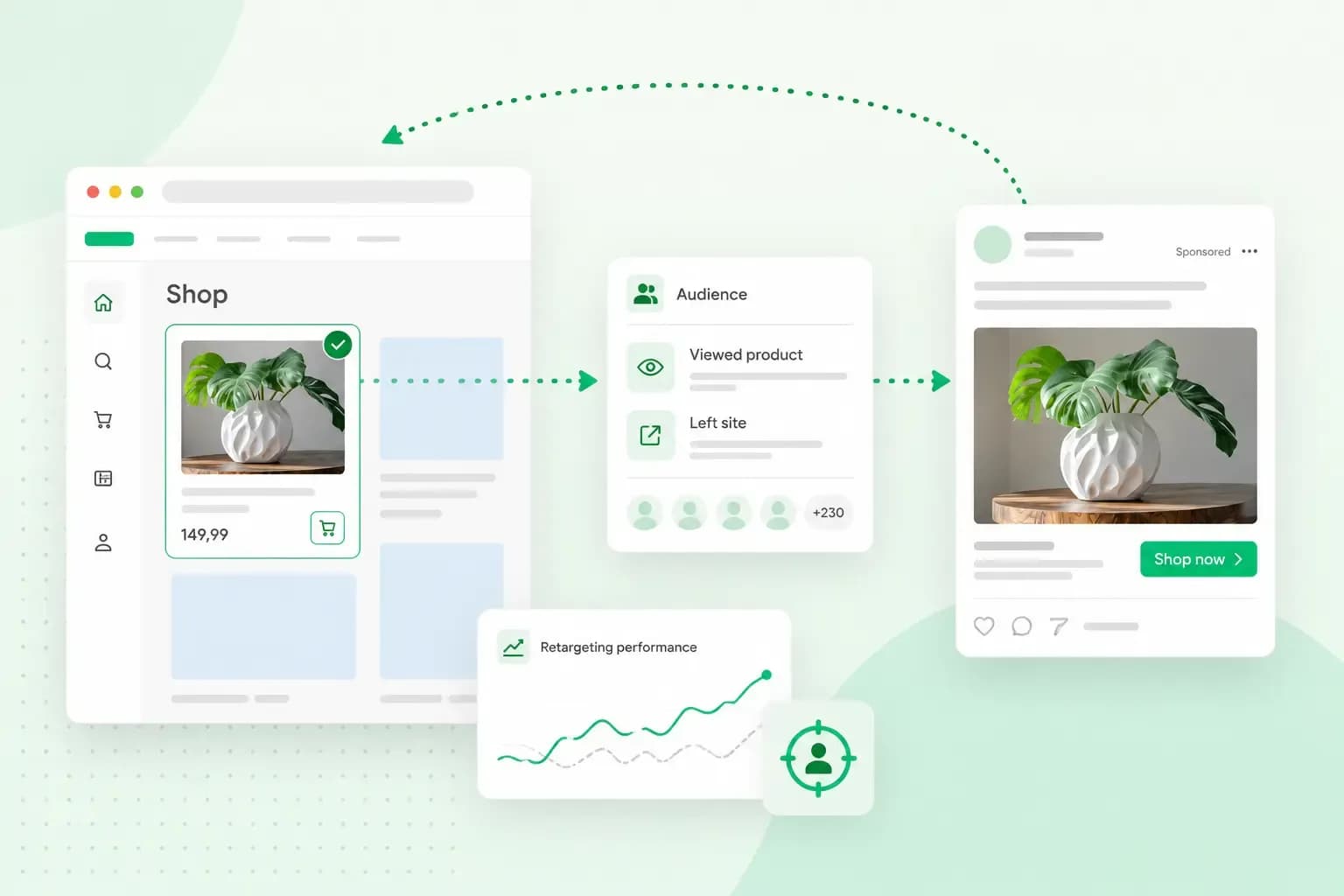
Retargeting, often called remarketing, means showing your ads to people who have already visited your website while they browse other sites, apps or social media. A visitor looks at a set of blue mugs in your ceramics shop at kilnandcopper.co.uk and leaves without buying. Later, that visitor sees an ad for the blue mugs from kilnandcopper.co.uk on a news site, and it reminds them to come back.
Many visitors leave a website without buying, booking or getting in touch. Retargeting gives you a second chance with visitors who showed an interest in what you sell.
How does retargeting work?
Retargeting runs on a small piece of code, usually called a tag or a pixel, that you add to your website. You get the code from the advertising platform. Google Ads, for example, asks you to install its Google tag on every page of your site.
When someone visits, the tag places a cookie in their browser where the browser allows it, or uses one already there, and tells the platform which pages they looked at. The platform then adds them to an audience. When that person later visits a site or app that shows ads from the same platform, your ad can appear there while your campaign runs.
What the tag records depends on the tracking tools you use and how you set them up. The Google tag notes the pages a visitor views, with their address and title. With a little extra code, it can also record actions such as these:
- a visit to a product page, such as the one for the blue mugs
- a purchase in your ceramics shop
- a form someone sends you, such as a question or a newsletter sign-up
- a new customer account that someone creates in your shop
With those actions, you can build an audience for each group of visitors. On kilnandcopper.co.uk, one audience could hold the visitors who looked at mugs and left, another the visitors who sent you a question.
Retargeting with a tag like this is called pixel-based retargeting. List-based retargeting starts from customer details you already have instead. In Google Ads this is called Customer Match. You upload a list of your customers, and Google shows your ads to them across its own services, such as Search, Gmail and YouTube. To target a list, though, your account must have run Google Ads for at least 90 days and spent more than 50,000 US dollars in total. Before that, as long as your account has a good record of following Google's policies and paying its bills, you can use the list to see how those customers respond to your ads or to leave them out of a campaign. In the UK and the European Economic Area, these lists only work on Google's own services, not on partner websites.
Some platforms can also fill each ad with the products a visitor looked at. Google Ads offers this as dynamic remarketing. You give it a feed, a list of your products with their details, and each ad picks a mix from it based on what that person viewed in your online shop and what's popular.
Retargeting vs remarketing
Retargeting and remarketing mean almost the same thing, and the words are often used interchangeably for ads shown to past visitors. Some marketers keep "remarketing" for emails to people who have already given you their address.
Google Ads uses the words in its own way. It calls its retargeting ads remarketing, and now uses the name "your data" for the feature, with each audience called a data segment. Expect to see all three names in Google Ads and its help pages.
A typical remarketing email goes to a customer who abandoned their shopping cart. If a customer put the blue mugs in their basket and then left, an email the next morning can show them what they left behind.
In the UK, a marketing email like this to an individual needs the person's consent first. For a shop, the one exception is your own customers. If you got someone's details when they bought from you, or asked about buying, you can email them about your similar products. They must have had a simple way to opt out when you collected the details, and in every email since.
It's worth using ads and emails together. The ads reach visitors whose address you don't have, and the emails reach customers who have agreed to hear from you.
Where you can run retargeting ads
Retargeting ads run on the big advertising platforms, such as Google Ads and Microsoft Advertising, and each one needs its own tag on your website.
With Google Ads, your ads reach past visitors as they use Google and browse its partner websites. You can also show ads to them when they search on Google again after leaving your site.
Microsoft Advertising works the same way with its own tag, called UET. You add the tag to every page of your website once. It then records what visitors do there, and you can build remarketing lists from it for your ads in paid search.
Social media platforms such as Facebook offer retargeting as well, each with a tag of its own. In most cases, it's worth starting with one platform: the one your customers already spend their time on. One campaign on one platform shows you what works before you pay for a second.
In Google Ads, a campaign might spend up to twice its average daily budget on a busy day. At the end of the month, a campaign will have spent no more than 30.4 times its average daily budget. The more advertisers compete for your keywords, the more each click tends to cost, as our guide to what Google Ads costs shows.
The benefits and limits of retargeting
For a small online shop, retargeting has a few clear benefits:
- People already know you: your ads reach people who have already been to your shop and seen your products. That gives you a head start over ads for people who have never heard of you.
- It catches people who got distracted: a visitor who left
kilnandcopper.co.ukhalfway through an order can see the blue mugs again in an ad. - It keeps your shop in mind: each ad is one more reminder of your shop and what you sell, even for visitors who aren't ready to buy yet.
- It helps you launch new products: when
kilnandcopper.co.ukadds a range of bowls, you can show the new range to people who have visited before. They already know your shop, and if they trust your brand, they're more likely to give the bowls a look. - The ad can show what they looked at: with dynamic remarketing, ads can show each visitor the products they viewed, not just your shop in general.
Retargeting has limits too. It only reaches people who have already found your shop, so you still need other ways to bring in new visitors. An ad can bring someone back to a product page, but the page has to do the rest, and clear product descriptions help them decide this time.
A small website may not have enough visitors to fill an audience at first. In Google Ads, an audience needs at least 100 active visitors or users in the last 30 days before your ads can show to it. For Search ads, Google's help pages give different minimums, so check the current one in Google Ads when you set up the campaign. It's worth leaving out customers who have already bought, so you don't pay to show them the mugs they own. Cap how often the same people see your ad as well, so it doesn't show up so often that it starts to annoy them.
What you need before you start in the UK
In the UK, you need your visitors' consent before a retargeting tag runs. Under the privacy rules known as PECR, you can only store or read information on someone's device if they agree, after you tell them clearly what it's for. Advertising is never one of the exceptions. These cover things such as what your site needs to work, settings that adapt the site to a visitor's preferences and, under strict conditions, statistics about how your own site is used. Google expects the same of its advertisers: you tell visitors clearly what data you collect, and get their consent where the law requires it.
Ask for consent with a cookie consent banner on a visitor's first visit. Make sure it explains which cookies your website uses and lets visitors accept or refuse the advertising ones. With Termly, you can create the banner and keep it up to date.
Once the banner is in place, the order is the same on Google Ads and Microsoft Advertising. With an account on Google Ads or Microsoft Advertising, you add the platform's tag to every page of your website and create an audience, such as the visitors who looked at your mugs. Your campaign for that audience then needs its ads and a daily budget. The ads only start to show once enough visitors have joined the audience, so on a small site this can take a while.
Consent comes first, so add Termly to your website to set up your cookie banner, and your first retargeting campaign can follow.
Termly scans your website for cookies and writes your cookie policy along with the banner.
Add Termly to your websiteRecommended reading
 Marketing19 Oct 2026
15 ideas for Black Friday marketing
Make the most of Black Friday with 15 marketing ideas to attract customers and boost sales. Discover ways to promote your offers, reach more shoppers and make your campaign stand out. Marketing30 Dec 2025
AI SEO: how to use AI for search engine optimisation
A basic guide to AI in SEO – let's look at how artificial intelligence can help you speed up your SEO tasks. Marketing30 Dec 2025
AI search optimisation: how to get your website into AI answers
A basic guide to AI in SEO – let's look at how artificial intelligence can help you speed up your SEO tasks.