
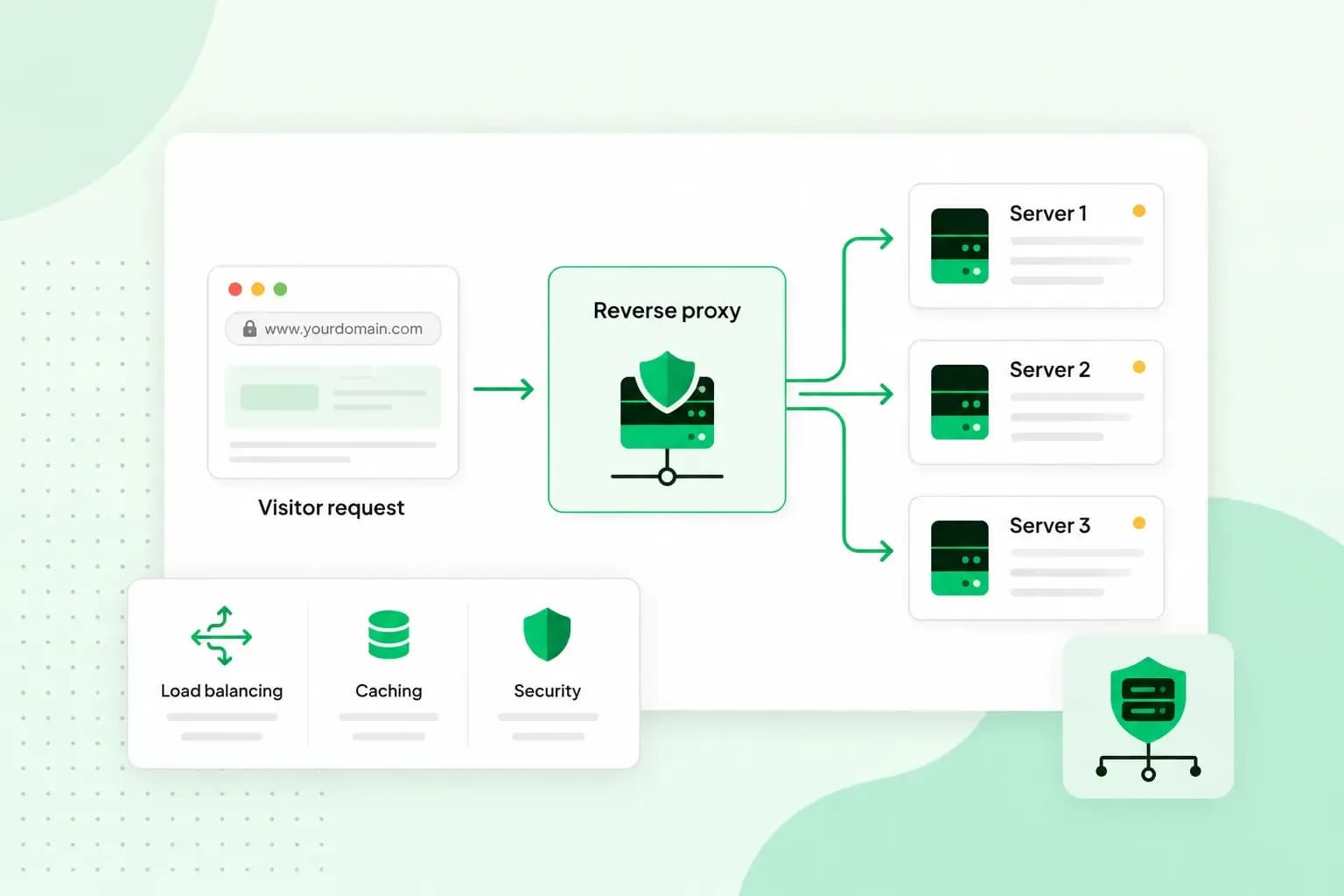
A reverse proxy is a server that stands in front of your website's servers and takes every request from visitors first. It passes each request on to the right server and sends the answer back, so to your visitors the proxy is the only source of your content. That lets it spread traffic over several servers, keep copies of files that rarely change, handle encryption and keep attackers away from the machines that run your site.
How does a reverse proxy work?
When a visitor's browser asks for a page on your domain, the request goes to the proxy first, not to the server that holds the page. The proxy checks the request and looks in its cache. If it already has a copy of what was asked for, it sends that straight back. If not, it forwards the request to one of the servers behind it, receives the response and passes it on to the browser. Your visitor only ever talks to the proxy and never learns what sits behind it.
What is the difference between a forward proxy and a reverse proxy?
A forward proxy works for the people browsing, while a reverse proxy works for the website and its servers. A forward proxy is what most people mean by a regular proxy server: it stands between users and the internet and fetches content from websites on their behalf. That lets users hide their IP address, and it lets an office or school network control how much bandwidth it uses. A reverse proxy works the other way round, which is where the name comes from: it receives requests on behalf of the servers it guards. So a forward proxy is set up by the user or by the network they browse from, and a reverse proxy by you, as the owner of the website.
| Forward proxy | Reverse proxy | |
|---|---|---|
| Works for | The clients, the people browsing | The servers of a website |
| Hides | The user's IP address from the websites they visit | The servers' IP addresses from visitors |
| Typical uses | Hiding a user's IP address, saving bandwidth on a shared network | Load balancing, caching, SSL encryption, access control |
What is a reverse proxy used for?
A reverse proxy is used to share out traffic, protect your servers, cache files, handle encryption, check who your users are, route requests and log your traffic. You'll get the most from it on a busy website or app, or when you run several applications on one server.
Load balancing
A reverse proxy can spread the traffic to your website over several servers, so no single server gets overloaded and your pages keep loading quickly. If one server stops responding, the proxy sends requests to the others, and your website stays online. If you've created an online shop, a big sale such as Black Friday is the moment you least want your server to crash under the rush.
Picture your website as a large office building reached by one road. When lots of cars arrive at once, the reverse proxy is the controller at the junction, sending the cars (the requests) to different entrances so that none of them gets jammed.
Protection from attacks
A reverse proxy makes your website harder to attack. Because every request goes through it first, visitors and attackers only see the proxy, never the IP addresses of your servers, and attackers can't aim at a server whose address they don't know. You can also set the proxy to limit how many requests each visitor may send. That helps against DDoS attacks, where floods of requests try to knock a site offline. On top of that, you can block suspicious IP addresses with a blocklist. Don't rely on the proxy alone for security, though: keep the software behind it up to date.
Caching
A reverse proxy can keep copies of files that rarely change, such as images, CSS and JavaScript files, and send them to visitors without asking your server each time. Your web servers have less to do, and your pages reach visitors faster. If you run an online shop, let the proxy cache your product photos but not the basket or checkout. Those pages are different for every shopper, so a stored copy would show the next shopper the wrong page. You set this in the proxy's cache rules, by leaving those page addresses out.
SSL encryption
When your website runs over SSL (the padlock and the https your visitors see in the browser), every page travels encrypted. That encryption takes extra processing power from your server. A reverse proxy can do this for every server behind it: it handles the encryption with your visitors and passes their requests on to your servers. This is often called SSL termination. You then manage your SSL certificates in one place, and your servers can spend their effort on the website itself.
Centralised authentication
If part of your site is only for certain people, such as a members' area, a staff portal or customer accounts, a reverse proxy can handle authentication: it checks who a user is before it passes their request on. That's centralised authentication, and it means you decide who gets in at the proxy rather than setting up access on each server.
Routing requests to the right server
A reverse proxy can send requests to different servers depending on the address that was asked for. For example, it can pass yourshop.co.uk/blog to the server that runs your blog and everything else to your shop, while your visitors see one website. It can also use the visitor's location, for example to send each visitor to the group of servers nearest to them.
Traffic monitoring and logging
Since every request passes through it, a reverse proxy is a natural place to log your traffic. The proxy records each request in its access log, so you can see which pages your visitors asked for and spot suspicious requests without going through the logs of several servers. You can also set it to record how long each request took, so you can spot slow pages.
Reverse proxy vs load balancer
Load balancing is one of the jobs a reverse proxy can do, but the terms don't mean the same thing. A load balancer needs several servers with the same content to share the work between. A reverse proxy is useful with a single server too, because it can still cache files, handle SSL encryption and keep the server's address hidden. Many tools, Nginx and HAProxy among them, do both. If you run one server, start with a reverse proxy for caching and SSL, and add load balancing once a single server is no longer enough.
Do you need a reverse proxy?
Not for a small website. If your site runs on our shared hosting, we run the servers and guard them with a web application firewall and DDoS protection, so there's nothing for you to set up. A reverse proxy is worth it when you run your own server, such as a VPS, and want to put several websites or apps behind one address, handle SSL in one place or spread a busy site over more than one server. If you already run your own server, set the proxy up while traffic is still low, so you aren't changing how visitors reach your site in the middle of a busy period.
Running one does add work. A reverse proxy is one more piece of software to set up, update and keep an eye on. And because your visitors reach your sites through it, a fault or a mistake in its configuration can take the sites behind it offline, even when the servers themselves are running fine.
Nginx and other reverse proxy software on a VPS
Nginx is a web server as well as a reverse proxy, and one of the most widely used web servers. According to W3Techs, Nginx runs on 30.8% of the websites whose web server is known (October 2026).
Other software does the same job. Apache can work as a reverse proxy through its mod_proxy module, Caddy serves your sites over HTTPS automatically once it knows your domain name, and HAProxy is a reverse proxy built for load balancing very busy websites.
To set up a VPS reverse proxy, you install the proxy software on your server and point your domain at that server. That change often takes a few hours to reach everyone. Once your domain leads to the server, you add an SSL certificate for each site the proxy serves. In Nginx, you then add a proxy_pass setting inside a location block for each site or app, naming the server that should get its requests (or a group of servers, for load balancing), and Nginx's reverse proxy guide covers each setting in full.
On a VPS, you install and configure the reverse proxy yourself, with full root access. Our VPS is unmanaged, so setting it up, securing it and keeping it updated is up to you. That is how a VPS and a Managed VPS differ: with Managed VPS, we handle the server maintenance for you. Nginx comes in its software stack as a reverse proxy, together with Apache, MariaDB, PHP and the Plesk control panel. If you're comfortable installing and updating server software, a VPS gives you full control. If you'd rather leave the updates to us, choose Managed VPS.
Managed VPS runs on Ubuntu with daily backups kept for 7 days. We look after the server maintenance, and you manage your websites and apps in Plesk.
Compare Managed VPS plansYour next step
Once you've picked your proxy software, the next thing you need is a server to run it on. Choose a VPS, install the proxy on it and point your first domain at it.
Recommended reading
 VPSOct 20, 2025
n8n VPS: automate with hosting on your own server
Work more efficiently with n8n automation on your own VPS. Learn how to use n8n in combination with AI. VPSOct 3, 2025
What is a server? Beginner’s guide to servers and their functions
Servers ensure that websites, online shops, and other online services run smoothly. Learn more about what a server is and how it works. VPSOct 3, 2025
Docker on a VPS: everything you need to get started
Develop and launch your next project more effectively with Docker on a VPS. Get started with these tips!