
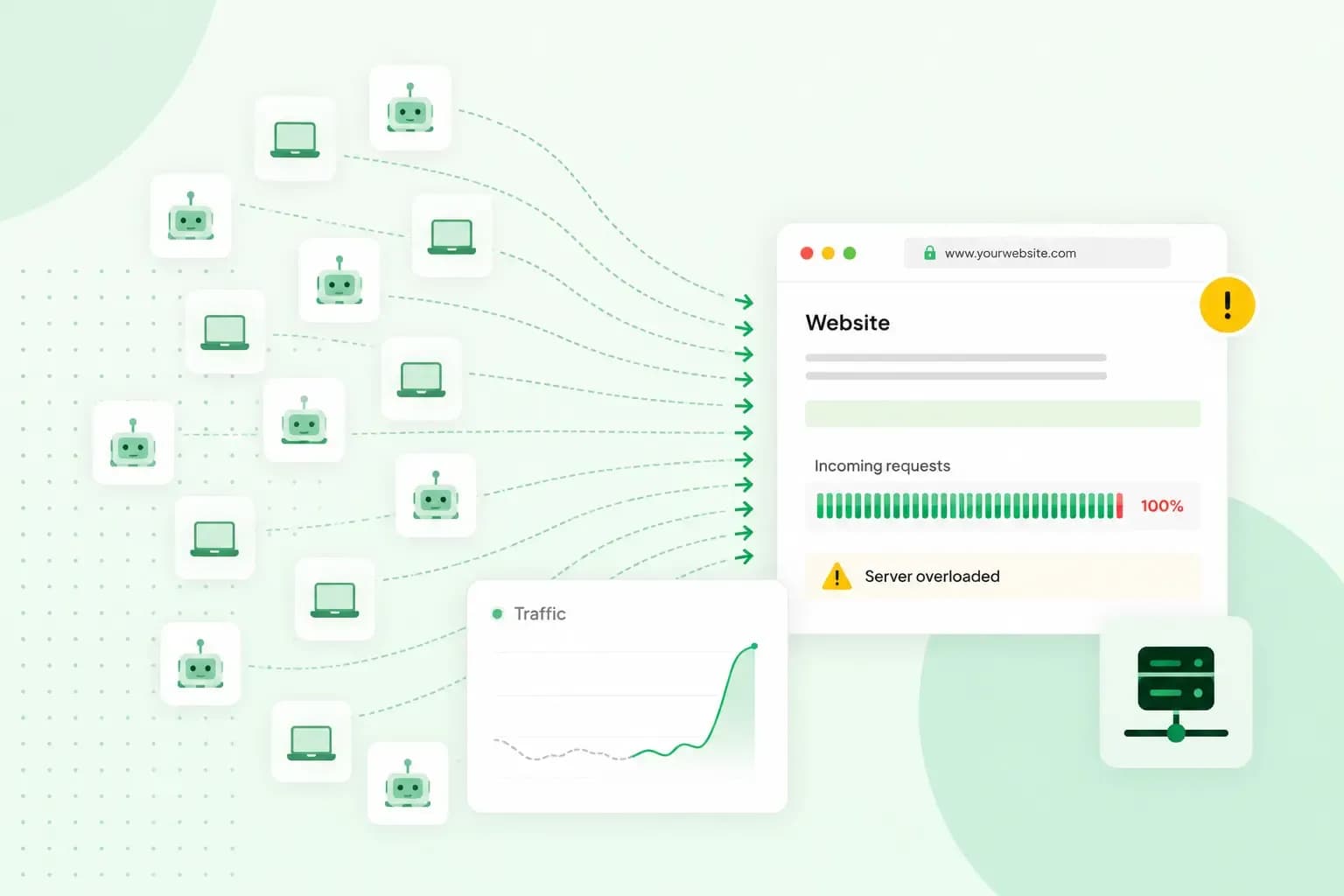
A DDoS attack is an attempt to make a website or online service unavailable by flooding it with more traffic than it can handle. The name stands for distributed denial of service, because that traffic comes from multiple machines working together. While the flood lasts, the site slows down or stops responding, so the visitors and customers trying to reach it can't get in.
A DDoS attack is one kind of cyber attack, but the attacker doesn't need to get into your website. The aim is to keep real visitors out of it.
How does a DDoS attack work?
The attacker starts by building a botnet: a group of computers and other internet-connected devices infected with malware and controlled from a distance. Attackers get their malware onto devices in several ways, such as phishing emails, compromised websites and fake software updates. Smart devices such as cameras and routers are easy targets when they still use their default password. The malware can run quietly in the background, so their owners may not notice anything.
When the attacker gives the command, the devices in the botnet send requests to the same website or server at once. Each request can look like an ordinary visit. Together, though, they go beyond what the server can handle. That limit can be the number of requests it can answer at the same time, or the bandwidth of its connection. Bandwidth is how much traffic a connection can carry, so when attack traffic fills it, not all of your real visitors' traffic can get through. Either way, the server can no longer answer real visitors.
Picture your online shop, where you sell home-baked biscuits, on a busy Saturday. Your regular customers are browsing and paying as usual when the flood of fake requests arrives. Those requests swamp your server, and your customers see pages that load very slowly or stop loading. Nobody has broken into your shop, yet your customers can't buy anything until the attack is over.
What is the difference between a DoS and a DDoS attack?
A DoS (denial of service) attack is launched from one computer, while a DDoS attack is sent from multiple sources at the same time. The aim is the same: overload the target so that real users can't reach it.
| DoS attack | DDoS attack | |
|---|---|---|
| Where the traffic comes from | One computer | Multiple sources, which can include devices in a botnet |
| How much traffic it can send | What one computer can generate | A larger volume than one computer can generate on its own |
| How hard it is to defend against | Easier, because there's one source to find and block | More difficult, because the traffic comes from many different addresses |
Attack-for-hire services rent out botnets, so almost anyone can pay to have a website taken offline.
What does a DDoS attack look like?
To you and your visitors, a DDoS attack looks like your website is broken or extremely busy. You'll usually notice one or more of these signs:
- Your site, or the files on it, take far longer than usual to open.
- Your website doesn't load at all, so visitors can't reach it.
- Your host or your statistics show far more traffic than normal, with no campaign or news to explain it.
None of these signs proves an attack on its own. A product that suddenly gets a lot of attention can bring a real rush of visitors. A technical fault can slow a site down too.
What is the purpose of a DDoS attack?
The purpose of a DDoS attack depends on who is behind it. Because a botnet can be hired, the attacker can be almost anyone with a motive:
- Money. Criminals threaten a business with an attack, or keep one going, unless it pays a ransom.
- Competition. Some attacks aim to damage a competitor's business by keeping its website out of customers' reach.
- Activism and politics. Activists use attacks to make a point, and some attacks are sponsored by states.
- A distraction. While you deal with the outage, the attacker can try a second attack somewhere else in your systems, so watch for login attempts or changes to your website that you don't recognise.
- Fun. Some attackers take a website offline just for the thrill of causing disruption.
How to prevent DDoS attacks on your website
Any website can be a target, small business websites included. You can't remove the risk of an attack completely, but you can be well prepared for one. The best place to start is where your website is hosted.
A determined attacker can send more traffic than your site could cope with on its own. You may then need your provider to stop that traffic before it reaches your site. Choose web hosting that filters attack traffic for you. DDoS protection holds back the flood itself. A web application firewall (WAF) adds a second filter: it checks the requests to your website against rules and blocks the ones that look harmful.
Whichever host you choose, find out what it does during an attack. Ask whether its protection switches on by itself, whether it tells you when it does, and whether extra traffic costs you more.
Our web hosting comes with DDoS protection and a web application firewall (WAF). Both are on by default, so there's nothing for you to switch on.
See hosting plansIf your hosting already filters attack traffic, you may not need to add anything else. Two more measures are worth adding when your site is a likely target, for example because it takes a lot of orders or has been threatened before:
- A content delivery network (CDN) serves your site from servers in many locations. That makes it very hard to overwhelm, and it can often help hold back attack traffic before it reaches your own server.
- If your hosting has no web application firewall (WAF), put a firewall in front of your site. It filters incoming traffic by rules, which can be adjusted when an attack starts.
Decide now what you'll do if an attack starts. If your site slows down or stops loading, contact your host first. They can see the traffic and help you find out whether it's an attack or a fault. Keep a way for customers to reach you that doesn't depend on your website, such as social media.
If someone threatens to attack your website unless you pay, don't pay. Paying is no guarantee that the attack stops or that it won't come back. Tell your host, and report the threat to Report Fraud if you live in England, Wales or Northern Ireland. If you live in Scotland, report it to Police Scotland on 101.
What is the difference between a DDoS attack and a brute force attack?
A brute force attack tries to get in, while a DDoS attack tries to keep everyone else out. In a brute force attack, a script or bot tries one password after another on a login page until one works. Once inside, the attacker can take over the account. A DDoS attack works from the outside instead: it overloads your site until it stops responding, but on its own it can't steal your data.
The best defence against brute force is a long, strong, unique password for every account, with two-factor authentication switched on where you can.
Is a DDoS attack illegal in the UK?
Yes, under section 3 of the Computer Misuse Act 1990 it's an offence to do something to a computer that you know is unauthorised, with the intent to impair how it works. The same applies when the intent is to prevent or hinder access to its programs or data, even temporarily. The maximum sentence for the offence is ten years in prison. The National Crime Agency lists DDoS attacks on websites among the cyber crime threats facing the UK.
The best time to deal with a DDoS attack is before it starts, and much of that work sits with your host. Choose one of our hosting plans with DDoS protection, and the filtering is on by default.
Recommended reading
 Website SecurityNov 6, 2026
"Your connection is not private": what it means and how to fix it
"Your connection is not private" means your browser couldn't trust a site's certificate. See when it's safe to continue and how visitors and site owners fix it. Website SecurityAug 11, 2026
Does your website need a cookie banner?
Find out when a cookie banner is required, the legal requirements that apply, and how you can easily make your website GDPR-compliant.- Website SecurityJul 13, 2026
What is domain theft and how do you protect your domain?
Learn what domain theft and domain hijacking means and how to protect your domain from external threats.