
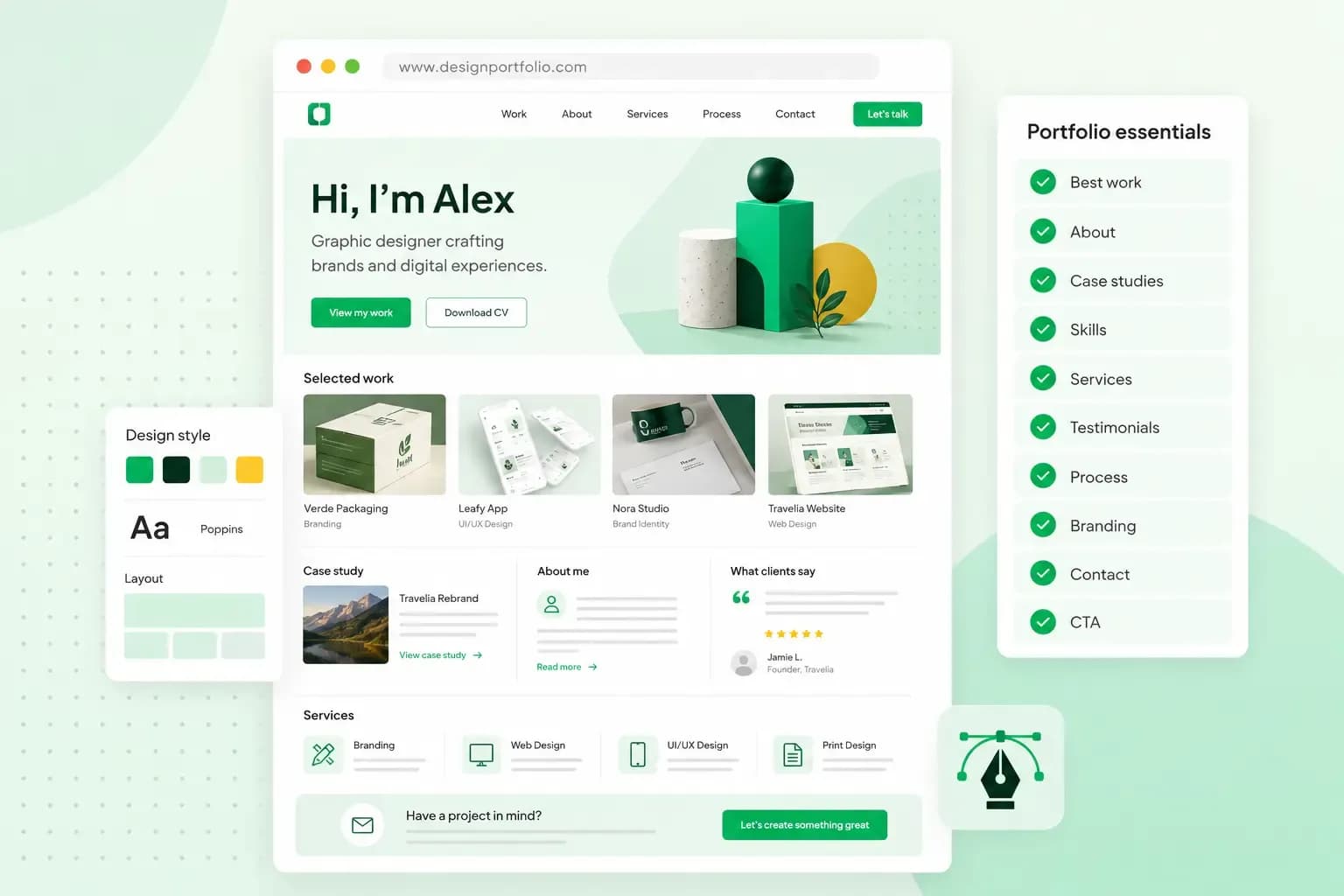
Your best projects are the heart of a graphic design portfolio: a small selection, each with a short story about the brief, your role and the result. Around that work, add the pages that help people hire you. These are your services, an about page, your experience, testimonials and clear contact details. Together, they show what you can do and make it easy for a client or an employer to get in touch.
All of this fits better on a portfolio website than in a single file, because a website has room for every part. You can also send clients and employers to one address.
How many projects should a graphic design portfolio have?
There's no fixed number, and quality matters more than quantity. The University of Staffordshire recommends no more than five pieces in an application portfolio for anyone interested in studying graphic design and illustration there. Coursera's guide says a portfolio might hold up to 20 pieces, as long as the way you show them doesn't overwhelm the viewer. If a course or an employer says how many pieces they want, follow that. Otherwise, choose a few well-presented projects over a long list, and add another only when it's as good as the ones already there.
Leave out anything you wouldn't want to be hired for again. One weak project makes a reviewer doubt the rest. Old work in a style you've moved away from brings in the wrong kind of enquiry. If you have little client work yet, personal projects, course assignments and collaborations count, as long as they show how you think. Once you have more experience, pick the projects closest to the clients or the job you want, and swap in new work as you go.
What should a graphic designer’s portfolio include?
Ten elements make up a strong graphic design portfolio, from a homepage and your best projects to contact details and testimonials. Most of them suit any portfolio, and testimonials come in once you have clients, colleagues or employers to quote. Bookings and a shop are extras to add if they fit how you work.
1. A homepage that shows who you are
Make your homepage say at a glance who you are and what you design. Add your name or logo and one line on what you do and for whom. Below that, give visitors a clear way to your work and your contact page. A striking image or one of your own pieces can carry the page on its own. Leave the rest, such as your full project list or a long bio, for the pages behind it.
2. Your chosen projects and their story
Treat your portfolio as a showcase of what you can do, not an archive of everything you've ever made. Pick your best projects, each with its story: the ones you're proud of for their quality, their originality or the thinking behind them. Include a few that show range across styles and formats as well.
For each project, show good-quality images and add a short description. Say what the brief was, what your role was, how you got from the first ideas to the final design, and what came out of it. Sketches, early versions or a before and after show how your ideas took shape.
3. Your specific services
Spell out what you offer, rather than just "graphic design". That could be visual identity, logos, editorial design, packaging, banners, social media graphics, signage or web design. Ideally, each service gets its own space on your website, with real examples of finished projects. If you have packages or starting prices, add them too.
4. Easy-to-access contact information
Your portfolio is there to bring in new clients or land your next job, so make it easy to reach you. A simple contact form and a professional email address on your own domain are the basics. Your phone number is worth adding if you'd like people to call, and your location if you work from an office or studio. Put a link to your contact page in your main navigation menu, so visitors can find it from every page.
5. Your personal story and values
An about page lets potential clients get to know the person behind the work. Tell your story there: how you got into design, what inspires you and how you like to work with clients. Explain why you do what you do, as well as what you do, which can help someone decide to work with you. Our about page examples show different ways to write one.
6. Your professional experience or CV
Next to your projects, add a section on your career, much like a traditional CV. It covers:
- Your education, such as a degree, courses or other relevant training.
- Your technical skills, such as the software and tools you work with.
- A summary of previous roles and the companies or clients you've worked with.
- A short paragraph that sums up your professional profile.
7. Client testimonials and references
Testimonials from past clients, colleagues or employers are a form of social proof: they let other people describe what it's like to work with you. Keep each one short. Add the person's name, their role or how they know you and, if possible, a link to their profile.
8. Links to your social media accounts
Link from your portfolio website to the social media accounts you use for work, so potential clients and employers can follow what you make over time. Leave out personal accounts that don't fit your professional image, such as a feed full of holiday photos.
9. An online booking system
If you work as a freelance graphic designer, let visitors book a call with you straight from your portfolio website. An online booking system lets potential clients book online at any time and saves you back-and-forth emails. It comes with the Booking and Commerce plans of our Aida AI Website Builder.
10. Optional: an online shop to sell your work
If you sell products as well as services, an integrated online shop can bring in extra income. With our Commerce plan, you can sell digital products from your portfolio site, such as templates, graphic resources or illustrations. You can also sell physical ones, such as posters or prints. Selling directly means there's no marketplace in between.
Website or PDF: which format should your portfolio take?
Your portfolio should live on a website, with a PDF version for the applications that ask for one.
| Portfolio website | PDF portfolio | |
|---|---|---|
| How you share it | As a link to your online portfolio | As a PDF file when a job advert, an agency or a course asks for one |
| What it holds | Your whole portfolio site, led by your best projects, each with its story | A short selection of projects for one application |
| Keeping it current | Keep it up to date as you finish projects | Adjust it for each job you apply for |
Our advice: build the website first and keep your portfolio up to date there. When an application asks for a PDF, choose a few projects closest to the role. Put the link to your website on the first page.
How to structure and design your portfolio website
A clear structure helps visitors find what they came for. As a freelance graphic designer, outline your portfolio website structure before you build: a homepage, a projects page with a page per case study, services, about and contact. Then design those pages so they show off your work rather than compete with it.
- Choose a visual style that matches your identity as a designer, whether minimalist, experimental or interactive. A clean, typographic style can highlight your attention to detail if you work with branding.
- Use a colour palette that reinforces your personal brand. Keep colours consistent across the site and save the brightest tone for buttons such as "View project" or "Request a quote".
- Pay close attention to typography. Limit the number of fonts and create a clear hierarchy between headings, subheadings and body text.
- Let your images do the work. Show high-resolution images that are compressed enough to load quickly, and use mock-ups, which place your design on a real object such as a poster or a phone screen.
- Make the site easy to use. Visitors should find your projects and your contact page without having to think about it.
- Make your portfolio responsive from the start. Responsive websites adapt their layout to each screen, so check yours on a phone as well as on a computer.
Our complete web design guide goes into more detail on each of these points.
How to build a graphic design portfolio website
Start with a domain name and a tool to build the site. Your domain is your website's address, and it can also give you a professional email address. Use your own name if you want to build a personal brand, or your studio name if you work under one. Besides the name, you pick the domain extension, such as a .co.uk domain or .uk for clients in the UK, or .com for international ones. If you want to secure the name before you build, you can register your domain name with us on its own first.
There are two common ways to build the site. WordPress gives you more control over themes and plugins, and you need a hosting plan alongside your domain to run it. You also keep WordPress, your theme and your plugins up to date yourself, unless you choose Managed Hosting for WordPress, which updates them for you. The Aida AI Website Builder plans include hosting and a free domain for the first year on selected extensions, which leaves less to set up. It's the quicker way to get a portfolio online, because your time goes into your projects rather than into running a website. Choose WordPress if you already know it or want to customise every detail.
The plan you choose decides what your site can do besides showing your work. Online bookings come with our Booking and Commerce plans, and the online shop comes with Commerce. Whichever plan you pick, you can adjust Aida's first version and decide how the finished site looks. Building with Aida takes four steps:
- Choose an Aida AI Website Builder plan. Besides the domain and hosting, it includes a professional email address, and this is where you pick your domain name.
- Describe your work and the clients or jobs you want. Aida then creates a first version of the site, with pages, text, images and a design to start from.
- Review the site and add your own projects, services and contact details. Ask Aida for changes in the chat, or edit elements yourself until the design looks like your work.
- Publish the site when it looks and works the way you want it to.
Put your best projects, services and contact details on a portfolio website at your own address.
Build your portfolio websiteCreate your portfolio and take the next step in your career
Once you've picked your strongest projects and written a short story for each, put everything in one place. Build that place as a portfolio website with the Aida AI Website Builder, and send its address to every client or employer you approach.
Recommended reading
 Website Builder19 Oct 2026
How to get your website ready for Black Friday (with checklist)
Get your website ready for Black Friday with this practical guide and checklist. Website Builder31 Aug 2026
How to redesign an existing website using AI
Discover how Aida AI can redesign your existing site in minutes, add new features, and help you create a site that's ready for business. Website Builder11 Aug 2026
How to prompt an AI website builder
Learn how to prompt an AI website builder to create a professional website for your business. Get examples for shops, salons, clinics, and more.