
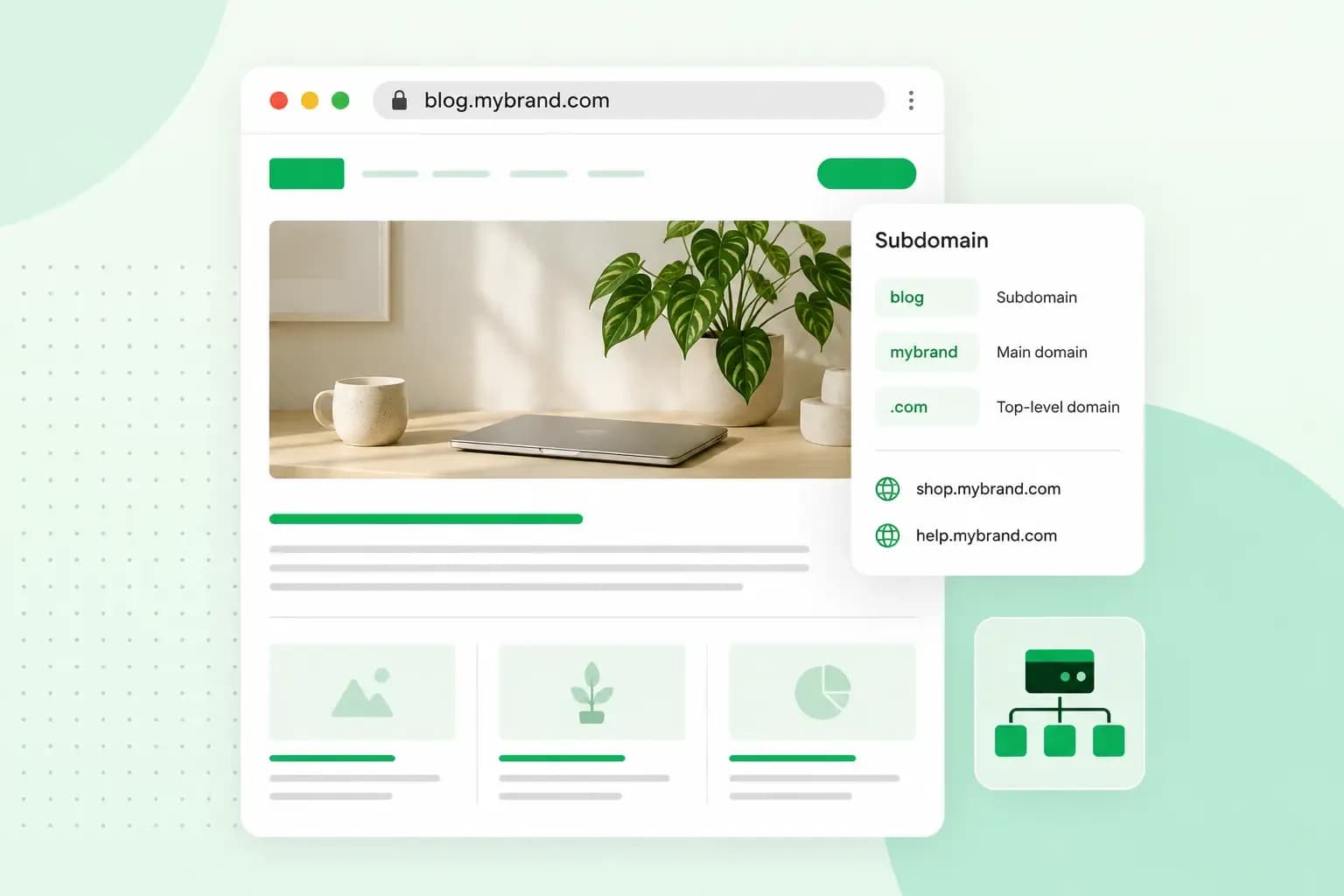
A subdomain is an extra name in front of your domain that gives one part of your website its own address. In shop.yourflowershop.co.uk, shop is the subdomain and yourflowershop.co.uk is your domain. Visitors reach the subdomain through your domain's name, but it can run a site of its own, on your hosting or on another provider's system.
How a subdomain fits into a web address
A web address is made of parts separated by dots. In shop.yourflowershop.co.uk there are three:
shopis the subdomain, the part you choose. It sends visitors to one section or site.yourflowershopis the name you register and renew to keep using it. Together with the extension, it makes up your domain name..co.ukat the end is called the domain extension.
The same goes for www: in www.yourflowershop.co.uk, www is a subdomain like any other, and you don't have to use it.
What are subdomains used for?
A subdomain is useful when one part of your site works differently from the rest, because it runs on another provider's system or shouldn't be public, as with these three parts of yourflowershop.co.uk.
- Your shop:
shop.yourflowershop.co.ukfor a shop system from another provider, with your main website staying where it is. - Bookings:
book.yourflowershop.co.ukfor a booking tool from another provider, where people book a place at your Sunday workshops. - A test site:
staging.yourflowershop.co.ukfor a copy of your website, to try a new design or plugin before it goes live. Protect it with a password, which also keeps it out of Google Search.
Should you use a subdomain or a subdirectory?
Use a subdomain for a part of your website that runs somewhere else, and a subdirectory, a folder of your main website, for pages that belong there, such as a blog at yourflowershop.co.uk/blog.
| Subdomain | Subdirectory | |
|---|---|---|
| Example address | shop.yourflowershop.co.uk | yourflowershop.co.uk/blog |
| Can run on another provider's system | Yes, a DNS record can point it there | Not through a DNS record, as it sits on your main website's hosting |
| Good for | A shop system, a booking tool, a test site | Blog posts, service pages and pages about your workshops, in most cases |
Our advice: for pages you want customers to find in Google, such as your blog and your workshop pages, a subdirectory is the better choice in most cases, because those pages gain from the search work you've already done for your main website.
Does a subdomain affect SEO?
Not directly. Pages on a subdomain can rank well, but Google doesn't always count a subdomain as part of your website. Google's guide to its ranking systems says that when it decides how many results from one site to show, it sometimes treats subdomains as separate sites, though it generally treats them as part of the main domain.
Pages that should bring in search traffic can do better in a subdirectory, where they sit with the rest of your website. If you put your blog or workshop pages on a subdomain, link to them from your main website and link back from the subdomain, so visitors and search engines can see that they belong together.
To see how your subdomains do in search, add your domain to Google Search Console as a Domain property. It covers your main website and all its subdomains, www included, in one place.
How many subdomains can a domain have?
With us, as many as you like, as long as your hosting plan includes web space. Subdomains are included with your domain, so you don't have to buy a new domain for each part of your site. A subdomain that only points to another provider, such as your booking tool, often uses a CNAME record in your domain's DNS rather than web space.
There is a limit on length, though. Each part between the dots can be up to 63 characters long, and the full name, subdomains included, can't go over 255.
You can also put a subdomain in front of another one, such as photos.book.yourflowershop.co.uk. That works, but each level you add makes the address longer and harder for customers to remember, so we'd keep to one level.
How to create a subdomain
How you set one up depends on where its site will run: on your own hosting, or with another provider, as with a shop system or booking tool.
For a website on your hosting
You add the subdomain in the control panel. If your control panel has no option for subdomains, as on a domain we haven't migrated yet, create a folder with the subdomain's name, such as shop, in your web space instead and put your website in it with an index file, the file that shows as the first page. The folder then automatically becomes the subdomain. The help guide in step 3 covers both ways.
- Check that your hosting plan includes web space, since a website on a subdomain needs it.
- Log in to your control panel.
- Add a subdomain and give it the name you want in front of your domain.
- Open the subdomain's folder from where you added the subdomain, since the file manager on your control panel's home page doesn't show it, then add your website's files there with an index file for the first page, or install WordPress there, which creates the index file for you.
- Open the new address in your browser and check that the page shows.
From then on, whatever you put in that folder shows at the subdomain's address.
For a tool at another provider
If your shop system or booking tool runs with another provider, you point the subdomain there with a CNAME record in your domain's DNS settings. Visitors who type book.yourflowershop.co.uk then reach the provider's pages.
- In the provider's set-up guide, note the address your subdomain should point to and any other record the guide asks for.
- Log in to your control panel and open your domain's DNS settings. If your domain uses another host's name servers, create the record with that host instead, since the record only works where the name servers are.
- Create a CNAME record: enter only the subdomain, such as
book, as the hostname and the address from the provider's guide as the domain it's an alias of, then save the record. Create any other record the guide asks for in the same place. - Give the change time: it often takes a few hours and can take up to 72 hours to reach everyone.
Once it works, open the address and check that the symbol beside the address in your browser shows the connection to your visitors is secure. If it doesn't, ask the provider to add an SSL certificate for your subdomain.
Whichever way you set it up, a subdomain needs a domain to sit in front of. If you're planning your site before you've got one, choose a name and register your domain first, then add subdomains as you need them.
Recommended reading
 Domain2 Oct 2026
What is a .si domain?
 Domain9 Sept 2026
How to choose a domain name - tips & tricks
With the abundance of websites on the internet, choosing a domain name can be overwhelming. Continue reading for some tips & tricks on how to pick yours. Domain5 Aug 2026
Domain names and SEO: what you should know
Start your website off on the right foot by choosing a domain name that will boost your website’s visibility on search engines.