
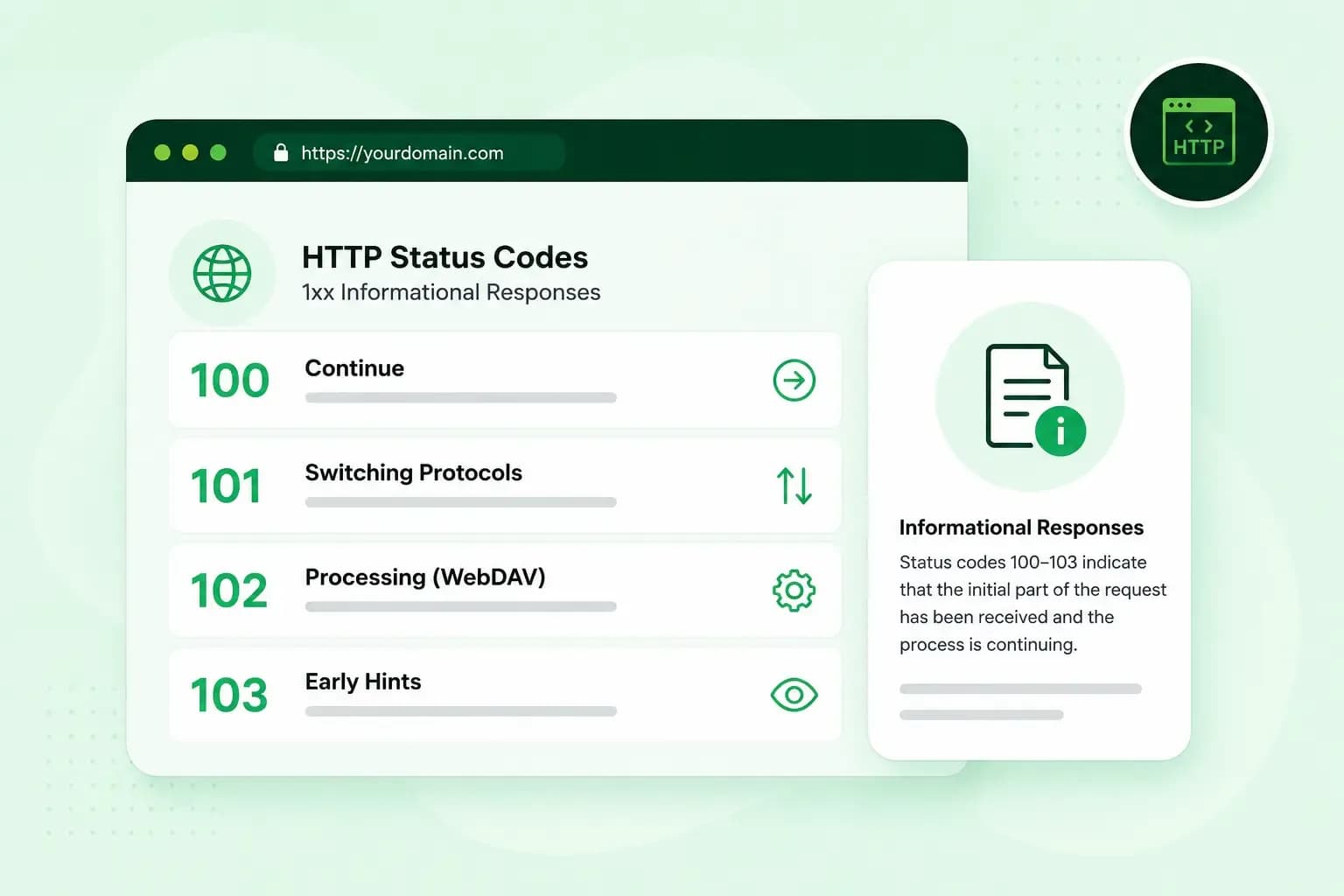
HTTP 100 to 103 are informational status codes. A server sends one while your request is still under way, before its final answer. The request comes from a client, which is your browser or any other program that asks a server for a page or a file. HTTP 100 says the client can carry on sending. HTTP 101 confirms a switch to another protocol, usually to WebSockets, and it's a normal step, not an error. HTTP 102 once meant the server was still working on the request, but the standard has since dropped it. HTTP 103 gives your browser Early Hints, so it can start loading the page sooner.
You won't see these codes on the page itself when you visit a site. If you look after a website, you're more likely to meet them in a server log, your browser's developer tools or a command-line tool.
What is a 1xx status code?
A 1xx status code is an interim response. It's how the web server tells your browser how a request is going while the final response, such as the page itself, is still to come. Each one holds only headers, the short lines of information that travel with a response, and never any page content. So there's nothing for a visitor to see, and you rarely notice a 1xx code. Browsers and other clients must be able to handle one or more of them before the final response, and a browser may simply ignore one it didn't expect.
What does HTTP 100 mean?
HTTP 100 Continue means the server has received the first part of a request and hasn't rejected it, so the client can send the rest. A client asks for it by adding the header Expect: 100-continue to its request. It then sends only the headers and waits for the server's answer before it sends the content itself.
Asking first pays off before a large upload, such as a video file. If the server would refuse the request anyway, the client finds out before it sends the whole file. That refusal could be a 401 because you need to log in first, or a 403 error because you don't have access. It could also be a 405 because the server doesn't accept that kind of request at that address.
When the server can't meet the expectation, it answers 417 Expectation Failed instead of 100. Common browsers don't send this header, but some command-line tools do by default. A tool like that is where you're most likely to see a 100 or a 417.
What does HTTP 101 mean?
HTTP 101 Switching Protocols means the server has agreed to change the protocol it uses on the connection. A 101 doesn't point to a problem. The client, usually your browser, asks for the switch with an Upgrade header. The server answers 101 with an Upgrade header of its own that names the new protocol, and from then on both sides use that protocol on the connection. If a server can't or won't switch, it ignores the Upgrade header and sends a normal response, such as 200 OK.
By far the most common use is WebSockets. A WebSocket keeps the connection open, so the server can send you updates the moment they happen, for example in a live chat, a live score or a notification that appears without reloading the page. Once the server has sent its 101, the connection becomes that two-way channel between browser and server. When you see a 101 next to a WebSocket connection in the Network tab of your browser's developer tools, the switch worked.
Switching protocols like this is part of HTTP/1.1. HTTP/2 doesn't allow it, which means you won't see a 101 on an HTTP/2 connection. That doesn't mean WebSockets fail on a site that uses HTTP/2. Your browser can open the WebSocket over a separate HTTP/1.1 connection, where you do see the 101. Otherwise, when the server supports it, your browser can use an extension of HTTP/2 that doesn't need one.
What does HTTP 102 mean?
HTTP 102 Processing meant the server had received the whole request and was still working on it. It was used with WebDAV, an extension of HTTP for managing files on a server, and first defined in RFC 2518, the standard that described WebDAV at the time. The later WebDAV specification left it out, so servers are no longer meant to send it.
Today, a server that's overloaded or down for maintenance answers with a final status code such as HTTP 503. A 503 tells your browser that the server can't handle the request for the moment, usually only for a short while.
What does HTTP 103 mean?
HTTP 103 Early Hints lets a server tell your browser which resources a page will need while the server is still preparing the page. The hints are usually Link headers. Each one asks the browser to preload a file, such as a style sheet or a script. A hint can also ask it to connect early to another domain the page loads files from, such as one that holds its images.
Your browser can use that waiting time to get ready, so the page can appear sooner once the final response arrives. Early Hints only help when the server needs time to put the page together, for example because it fetches data from a database. On pages like that, they're one way to improve your site speed. If your server can send the page straight away, there's nothing to gain.
Most browsers only act on a 103 over HTTP/2 or later, so in those browsers your site needs one of those protocols to benefit. You don't write these responses yourself. Your server software sends them, and Apache and NGINX both support Early Hints. In both, it's a setting: Apache doesn't pass a 103 on to browsers by default, and in NGINX a setting decides when it does. A content delivery network (CDN) such as Cloudflare can also send them for you.
What’s the difference between 1xx and 2xx status codes?
A 1xx status code is an interim answer that says more is on the way. A 2xx status code is the final answer and says the request succeeded, as 200 OK does when a page loads normally. A request can get several 1xx responses on its way, but only one final response. So when you spot a 100 or a 103 in your developer tools, the code that follows it tells you how the request ended.
Do you need to do anything about 1xx status codes?
Usually not. You can leave these codes alone in your logs. Knowing what they mean still helps when you troubleshoot a problem or talk it through with your developer or web host. They're worth a closer look in three cases:
- A failed upload. If your upload tool reports 417 Expectation Failed, send the request again without the
Expect: 100-continueheader and include the file straight away. - A failed WebSocket connection. If a feature on your site uses WebSockets and the connection gets a regular response instead of a 101, the server didn't agree to the switch. Check first whether a proxy, load balancer or CDN in front of your server passes the
Upgradeheader on, because without it your server never sees the request to switch. Then check that WebSockets are switched on in your server software. Your developer can do both checks if you'd rather not. - A slow page. If your pages take a while to build on the server, ask your developer or web host whether Early Hints can be switched on.
Now you can tell which of these codes are just the server keeping your browser informed and which point to a problem worth fixing. If you'd rather leave running the web server to us, compare our web hosting plans.
Recommended reading
 Hosting4 Aug 2026
What is cache?
What does cache mean? And how to clear your cache? Read the importance of cache and why it's necessary to clear your cache once in a while. Hosting4 Aug 2026
What is SSH?
How does SSH work & what does it do? Learn about the history of Secure Shell's predecessor Telnet and how SSH improved our internet security in this article. Hosting4 Aug 2026
What is a CMS (content management system)?
You can easily create and manage your website with a content management system (CMS). Want to know more? Learn all about CMS in this complete guide!