
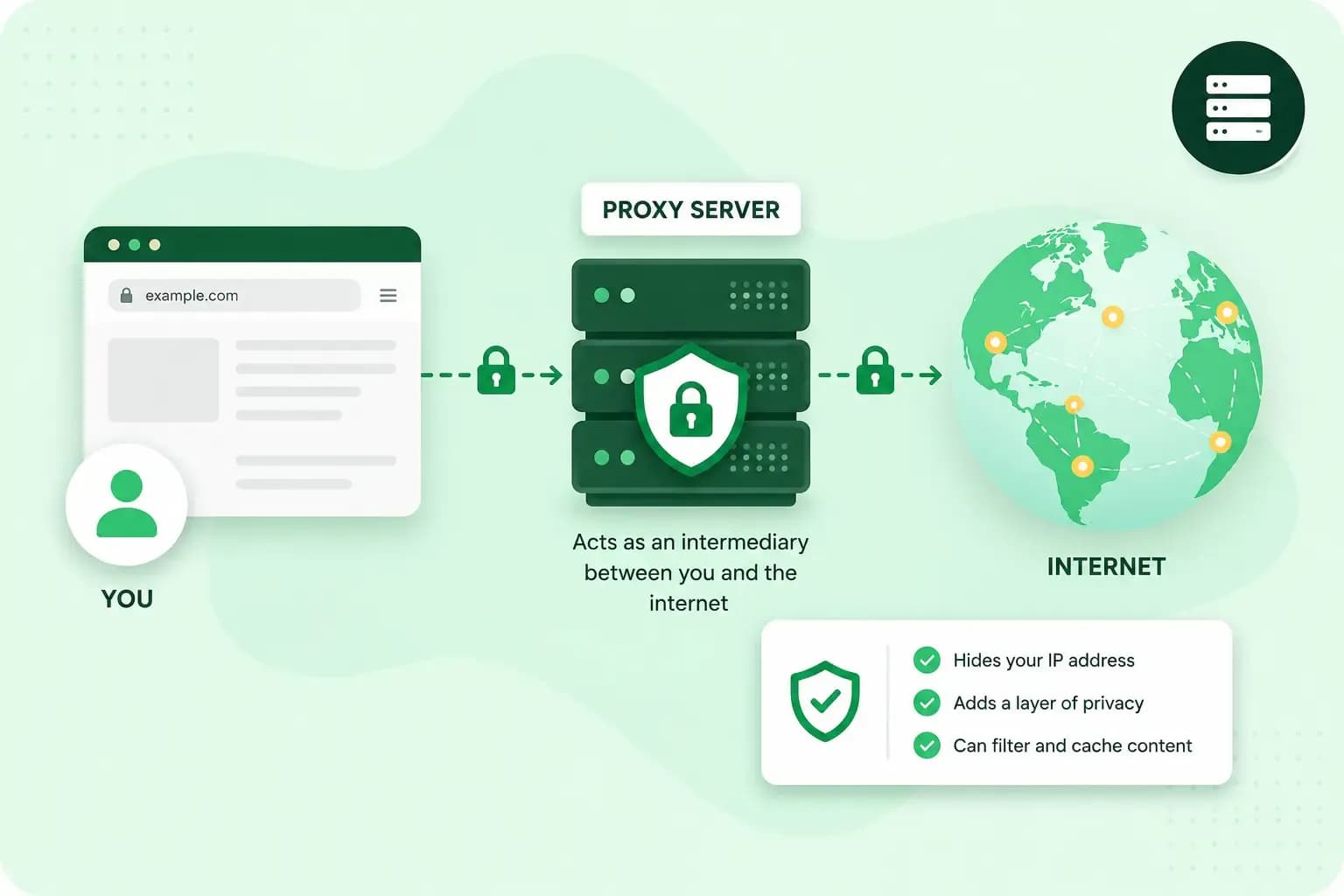
A proxy server is a server that sits between your device and the internet. When you open a website, your request goes to the proxy first, and the proxy fetches the page for you. Businesses, schools and individuals use a proxy to filter, speed up or hide their browsing.
How does a proxy server work?
A proxy server passes your request on to the website in your place, then hands you the answer the website sends back. Without a proxy, your browser sends its request straight to the web server that holds the page, and the server sends the page back to your IP address, so each side knows the other's address. A proxy can swap your IP address for its own before it passes the request on, and the website then sends its answer to the proxy.
A proxy doesn't have to pass everything on unchanged. It can change a request on the way, for example the extra details your browser sends with it, called headers, or answer it from a copy it already holds, without passing the request on at all.
You can see whether your computer uses a proxy in its proxy settings. On Windows, open the Settings app and select Network & internet > Proxy; on a Mac, open System Settings, select Network, choose your connection, then click Details and Proxies. Your company or organisation might require a proxy server, so on a work computer one may already be set up there. If a proxy is switched on that you didn't set up and you're not on a work computer, you can switch it off in the same place, then select Save on Windows or click OK on a Mac so the change is kept.
What is a proxy server used for?
A proxy server is used for four main jobs, and each has its limits:
- Hiding your IP address. The websites you visit see the proxy's IP address instead of yours, so they don't know where your traffic is coming from. They may still be able to tell that a proxy is in use.
- Caching. A proxy can keep copies of the websites people visit, so they load faster the next time. On a shared network, such as an office, caching also cuts the bandwidth the whole group uses: less data has to come in over the shared internet connection.
- Filtering and logging. A company or school can use a proxy as a content filter that blocks sites such as social media. Proxy software such as Squid can also log every request, so you can see which sites people visit.
- Reaching content blocked in your location. A proxy with an IP address in another country makes you appear to browse from there, so you may get past content that's restricted to that location. Some sites may refuse visitors who use a proxy, though.
How a forward proxy differs from a reverse proxy
Everything above describes a forward proxy, which acts on behalf of the people browsing. A reverse proxy does the opposite: it sits in front of a website's servers and takes the requests from visitors before they reach them, so the servers behind it can stay hidden.
| Forward proxy | Reverse proxy | |
|---|---|---|
| Acts on behalf of | The people browsing | The servers of a website |
| Sits | Between your device and the internet | In front of a website's servers |
| Can hide | Who is browsing | Which servers answer |
| Typical uses | Caching, saving bandwidth, hiding your IP address | Spreading visitors over several servers (load balancing), caching, checking who may log in (authentication) |
A reverse proxy is something a website's owner sets up, for example to spread the requests of a busy site over several servers.
Forward proxies also differ in how much they hide. A transparent proxy passes your real IP address on, and websites can tell you're using a proxy, so it adds no privacy. A proxy on a company or school network is likely to be this kind. An anonymous proxy promises not to pass your IP address on to the websites you visit, but they can still tell a proxy is in use, and you rely on the proxy to keep its promise.
How is a proxy server different from a VPN?
Both can hide your IP address from the websites you visit, but a VPN (virtual private network) also encrypts all your traffic between your device and the VPN server. Some proxies don't encrypt your traffic, so on a wireless network another user could eavesdrop on what you send through them. Unless your proxy provider says the connection to the proxy is encrypted, it's safest to assume it isn't.
Sites whose address starts with https:// load over HTTPS and are encrypted either way: people along the route can usually see which sites you visit, but not the pages you open, your login name or the messages you send.
| Proxy server | VPN | |
|---|---|---|
| Encrypts your traffic | Not always | Yes, between your device and the VPN server |
| Typical use | Filtering, caching, hiding your IP address, appearing to be in another location | Hiding your IP address, secure access to a company's network from elsewhere |
Are free proxies safe to use?
Not always. Free proxies in particular are prone to sudden disconnects, and not every proxy service is secure and private: some may log what you do online and sell your data. Whether you pick a proxy or a VPN, choose a provider you trust and read the terms you agree to.
Should you use a proxy server?
Only if you want to control, speed up or hide browsing. If you don't, you probably won't need one.
Our advice: if you're one person who wants to hide your IP address or appear to browse from another country, or you want to reach your company's files securely from home, a VPN is the better tool, because it encrypts the connection. A proxy is the right tool when your business needs to manage the browsing of a whole network, such as blocking sites at work or caching pages for an office.
If you're comfortable working on a server's command line, you can also run your own proxy, for example with Squid, on a server you control, so your traffic doesn't pass through someone else's service. A VPS (virtual private server) gives you a server of your own, with the dedicated resources and control to host it. Our standard VPS is unmanaged: you install, configure and maintain its software and security yourself. If you’d rather we look after the server, choose our Managed VPS.
Run your own proxy on a server with full root access, Linux or Windows, so you can install the software you need.
Choose a VPSRecommended reading
 Hosting4 Aug 2026
What is cache?
What does cache mean? And how to clear your cache? Read the importance of cache and why it's necessary to clear your cache once in a while. Hosting4 Aug 2026
What is SSH?
How does SSH work & what does it do? Learn about the history of Secure Shell's predecessor Telnet and how SSH improved our internet security in this article. Hosting4 Aug 2026
What is a CMS (content management system)?
You can easily create and manage your website with a content management system (CMS). Want to know more? Learn all about CMS in this complete guide!