
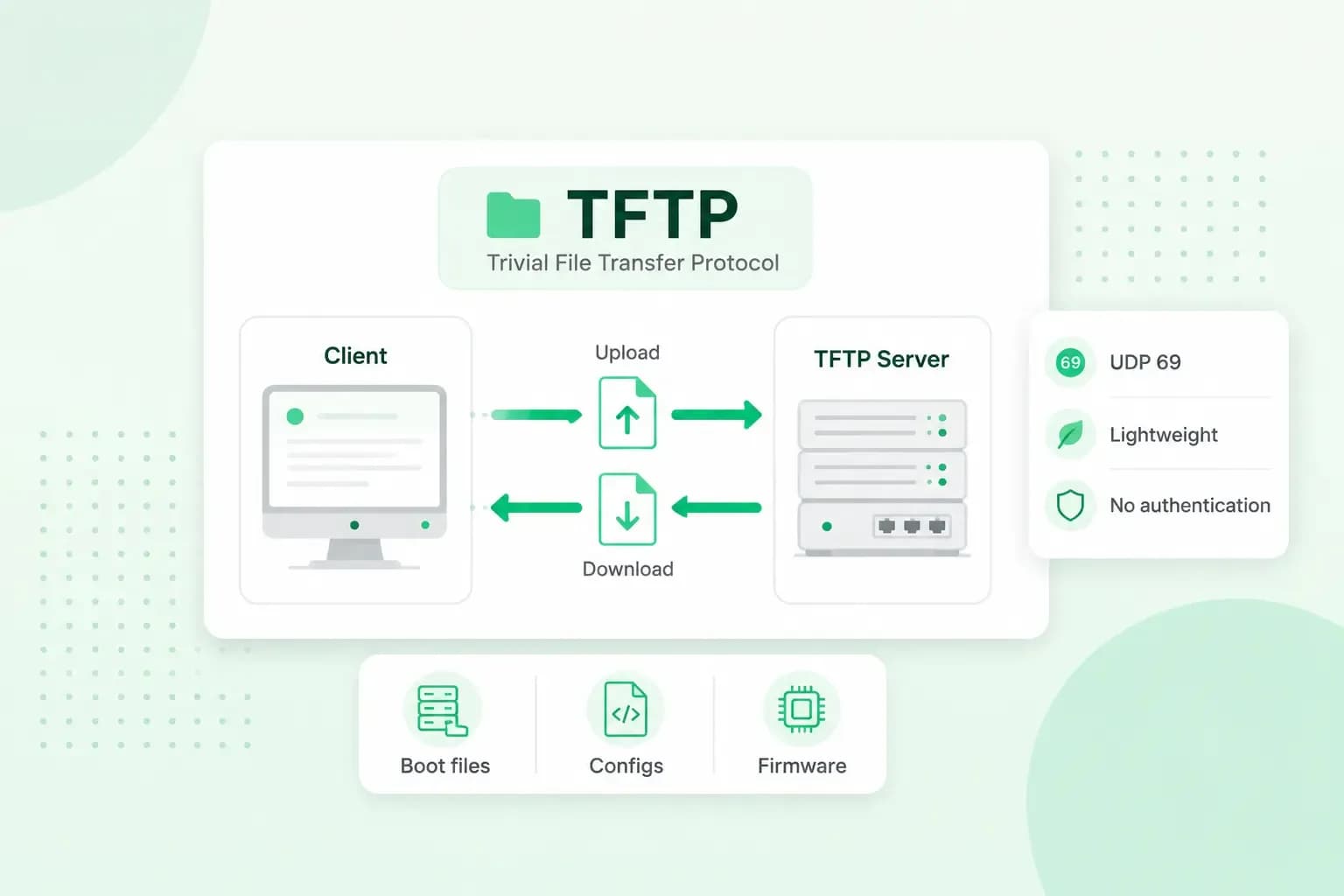
TFTP stands for Trivial File Transfer Protocol. It's a very simple way to move files between devices on a network: a device asks a TFTP server for a file by its name and gets it, with no login and no encryption. Because it has no such protection, TFTP is mostly used inside local networks, for example to give a router or an IP phone its software or settings.
What is TFTP used for?
TFTP is used mainly by embedded devices, such as routers and IP phones, or by devices that are still starting up, because it's very simple to build into software. It can only read and write files: it can't list folders, and it has no way of checking who you are. You'll usually come across it in one of these jobs:
- Network booting. A computer that starts up from the network, for example with PXE, the standard that lets a computer boot over the network instead of from its own disk, fetches its first boot files from a TFTP server.
- Firmware updates. You can give your router new software by copying the new firmware image to it from a TFTP server.
- Configuration files. Devices such as IP phones fetch their configuration from a TFTP server when they start up.
If your router's manual tells you to update it over TFTP, you need a TFTP server program, which you'll usually have to install first, running on a computer that can reach the router over the network, for example one on the same local network, with the new firmware image in the folder that program shares. You then start the update on the router and give it your computer's IP address and the name of the file, and the router fetches the image itself. Your router maker's guide gives the exact steps for your model.
How does a TFTP server work?
A TFTP server waits for requests. A TFTP client, the device or program that wants a file, sends the server a request to read a file or to write one, and names the file. If the server accepts the request, the transfer starts straight away.
The file travels in blocks of 512 bytes, and after each block the receiving side sends back an acknowledgement, a short message saying the block arrived. Only when that acknowledgement is in does the next block follow. When a block arrives with less than 512 bytes, the receiver knows the file is complete. If a block or an acknowledgement goes missing on the way, the side that's waiting times out and may send its last message again.
This one-block-at-a-time approach keeps TFTP simple, but it also limits its speed, even on a local network: the sender has to wait for each acknowledgement before it can send the next block.
Which port does TFTP use?
TFTP uses UDP port 69, but only for the first request. The server then answers from a port it picks for that transfer, and the rest of the transfer runs between that port and a port on the client. UDP itself doesn't guarantee that data arrives, which is why TFTP checks every block with its own acknowledgements.
What is the difference between TFTP and FTP?
TFTP and FTP both move files, but FTP does a lot more: it asks you to log in and lets you work with the files on the server, while TFTP only fetches or sends a file you name. They also run over different transports and ports.
| TFTP | FTP | |
|---|---|---|
| Transport | UDP | TCP |
| Port | 69 | 21 for commands and, in active mode, 20 for the data itself |
| Login | None | Username and password |
| Encryption | None | None: the password is sent in clear text |
| What you can do | Read or write a file you name | List folders, upload, download, rename and delete files |
If you use FTP, your username and password are what keep others out, so it's worth choosing a secure password. TFTP has no such lock: anyone who can reach the server can fetch a file, as long as they know its name.
Is TFTP secure?
No. Anyone on your network can read what TFTP sends, and anyone who can reach a TFTP server can request its files. Microsoft says TFTP can introduce a security risk and advises against installing even the TFTP client on computers connected to the internet. For the same reason, it no longer provides a TFTP server with Windows.
Keep TFTP inside your own local network, for example to send a new firmware image to your firewall from a computer on the same network. Run the server only while you need it, put only the files your devices need on it, and make sure it can't be reached from the internet.
Which protocol should you use for your website files?
Use SFTP for your website files. It runs over a secure channel, an SSH connection, so your password and your files are protected on the way. Never use TFTP for your website: your site sits on a server that's connected to the internet, where TFTP, with no login, would let anyone read its files or write files to it. Plain FTP isn't safe enough either, because it isn't encrypted and even sends your password in clear text, and that's the main reason to pick SFTP over FTP. With us, SFTP is the one to use whichever server your website is on: our new servers no longer offer FTP at all, and older servers still have FTP alongside SFTP.
Our hosting plans come with SFTP and SSH access, so you can upload and edit your website's files securely.
See hosting plansRecommended reading
 HostingAug 4, 2026
What is cache?
What does cache mean? And how to clear your cache? Read the importance of cache and why it's necessary to clear your cache once in a while. HostingAug 4, 2026
What is SSH?
How does SSH work & what does it do? Learn about the history of Secure Shell's predecessor Telnet and how SSH improved our internet security in this article. HostingAug 4, 2026
What is a CMS (content management system)?
You can easily create and manage your website with a content management system (CMS). Want to know more? Learn all about CMS in this complete guide!