
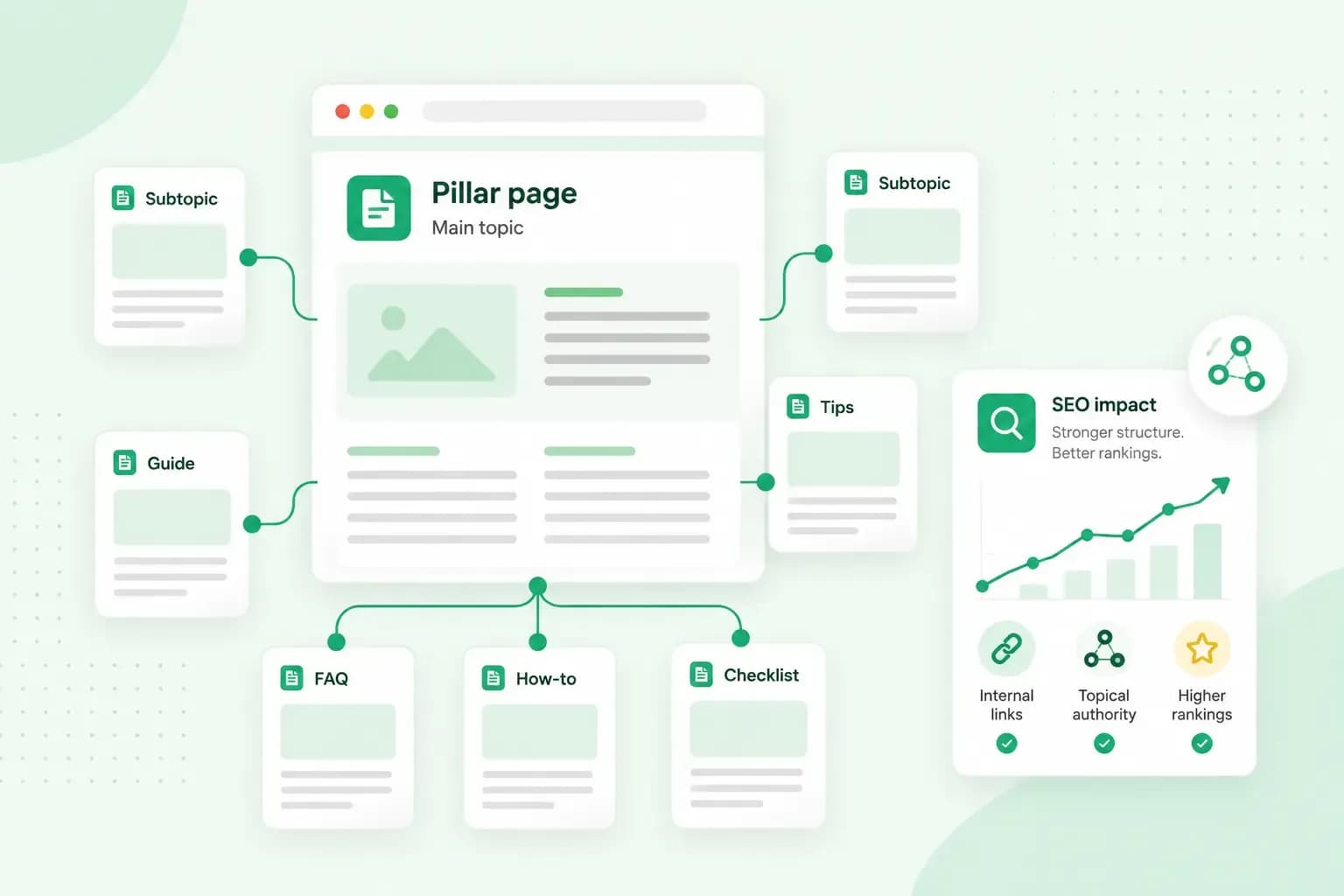
A topic cluster is a group of pages on your website about one subject. A broad pillar page gives the overview and links to several cluster pages, which each cover one part in depth and link back to it. If you run an online health food shop at crumbandoat.co.uk, your cluster could be a guide to baking with wholegrain flour. Separate pages then cover flours, bread rolls, sourdough and spelt.
Linking the pages this way helps search engines discover your content. Your visitors can also follow the links from one page to the next.
How a topic cluster works
The pillar page
A topic in SEO is a main subject your customers are interested in, like wholegrain baking, rather than a single search term. Your pillar page covers that whole topic. It touches on each part briefly and leaves the detail to the cluster pages. A reader gets the overview first and then picks the part they need.
Our own Academy works this way. We have a main article on SEO that covers the basics, and separate articles go deeper into parts such as keyword research and internal links.
Cluster pages
A cluster page, sometimes called a supporting page or subpage, answers one specific question within the topic and links back to the pillar page. One cluster page on crumbandoat.co.uk could cover the different types of wholegrain flour. It goes deeper than the pillar page could. It also answers the more specific questions people search for, such as which flour works best for bread.
The internal links between them
Each cluster page is joined to the pillar page with internal links, so readers can move through the cluster from any page. Google says it uses links to find new pages to crawl and as a signal of how relevant a page is. Linking your pages this way can make it easier for Google to see how they relate.
The words you link matter too. Good anchor texts tell readers and search engines what the linked page is about, such as "types of wholegrain flour" rather than "click here".
Why topic clusters matter for SEO
The links in topic clusters make your pages easier for Google to find, and they can help show that you know a subject well.
Showing that you know a subject is what SEO guides call topical authority. You build it by covering the subject thoroughly and linking those pages together. Your website then becomes a relevant source of information on that subject.
Google's own guidance says its systems aim to put the most helpful content first. If your blog answers the questions customers ask about baking with wholegrain flour, someone who searches one of them can land on a page that helps. The links then lead them on to the next one.
You may also read that clusters help with E-E-A-T, short for Experience, Expertise, Authoritativeness and Trustworthiness. Google uses it to describe the qualities its systems look for in content, and says trust matters most. Google is clear, though, that E-E-A-T is not a ranking factor in its own right. A cluster does give you room to show real experience, such as recipes you've tested and an honest comparison of the flours you stock.
The same pages help you sell. Many people want more information before they buy, and a company blog with a page for each of their questions gives them that. Pages that answer those questions and lead on to your products can also lift your conversion rate.
A topic cluster example
Your shop at crumbandoat.co.uk has just added a range of wholegrain flours, and you want customers who look for baking help to find them. The cluster for that has one guide and four cluster pages:
- The pillar page: a page such as "The complete guide to baking with wholegrain flour", with a short section and a link for each subtopic.
- Flours: a page such as "A guide to wholegrain flours".
- Bread rolls: a page such as "How to bake soft wholemeal rolls".
- Sourdough: a page such as "Rye sourdough, from starter to loaf".
- Spelt: a page such as "Baking with spelt".
The guide and each cluster page link to each other. The flour page also links to the bread rolls page, where a reader is likely to go next. Whichever page a customer lands on, the links lead them to the rest of the cluster and to the flours you sell.
How to create topic clusters
When you want to group your content on one subject into a cluster, you can start from scratch or from pages you already have. Work through these six steps in order.
- Choose one core topic that matters to your business and your target audience, broad enough for several pages. Then look at what you've already written on it.
- Use keyword research to find the words people type into Google for the topic and each of its subtopics.
- Plan the pillar page and the cluster pages, with one group of keywords for each page. A content calendar helps you publish the pages in a sensible order.
- Write the pillar page first, then the cluster pages. Use your keywords naturally and write SEO-optimised content that answers what your readers want to know.
- Link the pillar page to each cluster page, and each cluster page back to the pillar page.
- Measure the cluster as a whole, starting with the traffic to the pillar and its cluster pages in Google Analytics 4. A path exploration there shows whether visitors click from one cluster page to another. Google Search Console shows which of the cluster's keywords your pages appear for in Google, and where they rank.
Each page gets its own group of keywords in step 3 because two pages that target the same searches can compete with each other in Google. If you already have pages on the topic, one may work as the pillar page, and others can become cluster pages once you add the links. Where two pages answer much the same question, it can be worth merging them into one.
The numbers from step 6 tell you where to work next, once new pages have had time to show results. When a cluster page gets fewer visitors than you hoped, run a content audit to see what to improve.
For step 4, your pages need somewhere to go live. A website with a blog works well, because you can add a post each time your customers ask a new question.
Questions about topic clusters
How many pages does a topic cluster need?
There's no fixed number. Start with a pillar page and a handful of cluster pages, and add more as you find new subtopics people search for.
Is a topic cluster the same as a keyword cluster?
No. A keyword cluster is a set of search terms that mean much the same thing, like "wholegrain flour" and "best wholemeal flour for bread". Your topic cluster is made of pages, and each page in it can target its own keyword cluster.
Your first cluster starts with the topic your customers ask about most. If you're starting from scratch, you can build a website with Aida AI Website Builder and publish your wholegrain baking guide first. Then link each cluster page to it as it goes live.
Recommended reading
 Online MarketingOct 19, 2026
15 ideas for Black Friday marketing
Make the most of Black Friday with 15 marketing ideas to attract customers and boost sales. Discover ways to promote your offers, reach more shoppers and make your campaign stand out. Online MarketingDec 30, 2025
AI SEO: how to use AI for search engine optimisation
A basic guide to AI in SEO – let's look at how artificial intelligence can help you speed up your SEO tasks. Online MarketingDec 30, 2025
AI search optimisation: how to get your website into AI answers
A basic guide to AI in SEO – let's look at how artificial intelligence can help you speed up your SEO tasks.