
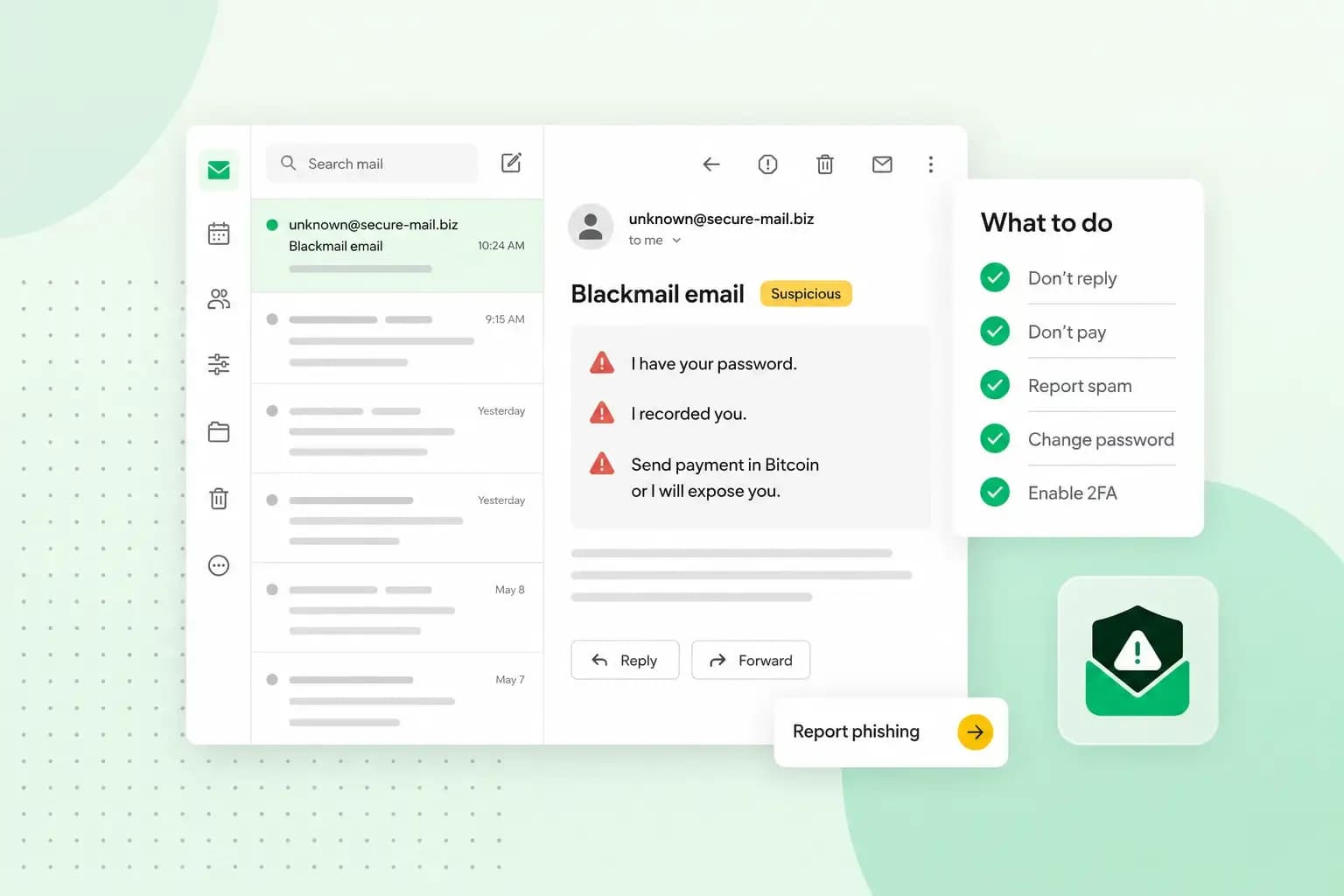
If you’ve received a blackmail email, you don’t need to reply and you don’t need to pay. It’s a scam that relies on pressure, not proof: even when the email shows one of your passwords or seems to come from your own address, that most likely doesn’t mean the sender has been into your device.
What is a blackmail email?
A blackmail email is a scam in which someone claims to have something private about you and threatens to send it to your friends, family or contacts unless you pay. Many blackmail email scams are a form of sextortion: in a sextortion email, the sender threatens to release nude or semi-nude images of you, real or faked, unless you pay.
The scammer doesn’t need access to your device to send one. They tell you you’ve been hacked whether that’s true or not, and use threats and pressure to push you into paying before you stop to think. If you have shared intimate images with someone who is now threatening you, take the same steps below and report it to the police as well.
How to spot a blackmail email
A blackmail email usually has several of these signs:
- A password you’ve used, which makes the threat look real.
- Your own address as the sender, which is easy to fake.
- Claims that you’ve been hacked and that the sender has your images, personal information and contacts.
- A demand for money or another payment, such as a pre-paid gift card.
- A short deadline that pressures you to act without thinking.
Why the email shows your password
The password was most likely stolen in a data breach rather than taken from your computer. According to the NCSC, data breaches, where a company that holds your details is hacked, are the most common way that passwords are stolen, and criminals then try the stolen passwords on other accounts. Step 4 below shows how to check whether your email address has turned up in a known breach.
Treat it as a leaked password if you still use it, and change it everywhere it’s used. Reusing a password is what turns one breach into a problem for all your accounts, so use secure passwords you can remember, a different one for each account.
Why the threatening email comes from your own email address
A threatening email from your own email address usually doesn’t come from your account: scammers can fake the sender address. This trick is called spoofing, and it works by putting your address in the sender field, so the email looks as if you sent it to yourself.
To check that nobody has used your account, look in your sent folder. Messages there that you don’t recognise are a sign that your account really has been hacked: change your password straight away and scan your devices for viruses and malware. Malware is software that criminals get onto a device to steal information such as passwords.
If your email address ends in your own domain, such as you@yourbusiness.co.uk, an SPF record makes spoofing your address harder. That record is a setting on your domain that tells mail servers which servers may send email for it, so an email in your name from any other server can be rejected or treated as suspicious. It can’t stop spoofing completely, because not every receiving server checks SPF records. If your domain uses our name servers, our standard SPF record is switched on automatically for newer domains, and if it isn't switched on for yours, you can switch it on yourself in the control panel; on another host's name servers, you set the SPF record at that host.
What to do now, step by step
If you have received a blackmail email, take these steps in this order:
- Don’t click any links in the email.
- Don’t reply, and don’t pay. Paying is no guarantee that the threats stop, and once you’ve shown you can pay, you’ll probably be asked for more.
- If the email reached your inbox rather than your spam or junk folder, forward it to
report@phishing.gov.uk, the reporting service of the National Cyber Security Centre (NCSC). - Check whether your email address has turned up in a known data breach at Have I Been Pwned (haveibeenpwned.com).
- If the email shows a password you still use, change it as soon as possible, starting with your email account.
- If you've already paid, or you're going to report it to the police, keep the email and any other messages as evidence rather than deleting them.
Once you’ve dealt with it, you can delete the email. If Have I Been Pwned lists your address, change the password of each account involved in that breach, and of every account where you used the same password.
How to report a blackmail email in the UK
To report the email itself, forward it to the NCSC, as in step 3. The NCSC can't tell you what came of your report, but it acts on every message it gets, and it can investigate scam email addresses and websites and have them taken down.
If you've already paid, call your local police on 101; if you think you've been the victim of another kind of fraud, report it too:
- In England, Wales and Northern Ireland, report it to Report Fraud at reportfraud.police.uk or on 0300 123 2040.
- In Scotland, call Police Scotland on 101.
If you’ve paid, don’t pay anything more, and don’t blame yourself: you were tricked. Call 999 instead of 101 if you feel at immediate risk of harm.
How to protect your email from the next one
Give your email account a strong password that you don’t use anywhere else. It matters more than any other, because whoever gets into your email can reset the passwords of your other accounts. The NCSC suggests combining three random words, or using a password manager that creates and remembers passwords for you.
Turn on two-factor authentication (2FA), also called two-step verification, wherever your accounts offer it. You then confirm a login with a code or an app as well as your password, so a leaked password alone isn’t enough to get in. With our email plans, you also get an alert when there’s an unfamiliar login to your account.
A spam filter moves suspicious email out of your inbox, so fewer scam emails and other spam reach you. In our Webmail, we recommend keeping the spam filter switched on.
Keep the devices you read your email on up to date, and scan them regularly for viruses and malware. When a hacker does get into an email account, it’s often through malware that picked up the password, so this is as much a part of email security as a strong password.
If you use email for your business, an email address on your own domain lets you set an SPF record for it, so scammers find it harder to pose as you.
Our email plans come with spam and virus protection and alert you to unfamiliar logins.
Choose an email planRecommended reading
 Website Security11 Aug 2026
Does your website need a cookie banner?
Find out when a cookie banner is required, the legal requirements that apply, and how you can easily make your website GDPR-compliant. Website Security13 Jul 2026
Domain Theft in 2026: What It Is, Why It’s Rising, and How to Protect Your Domain
Learn what domain theft and domain hijacking means and how to protect your domain from external threats. Website Security3 Nov 2025
What a EULA is and how to write one
Including an End User License Agreement is essential for your app, software, or digital service. We'll tell you everything you need to know.