
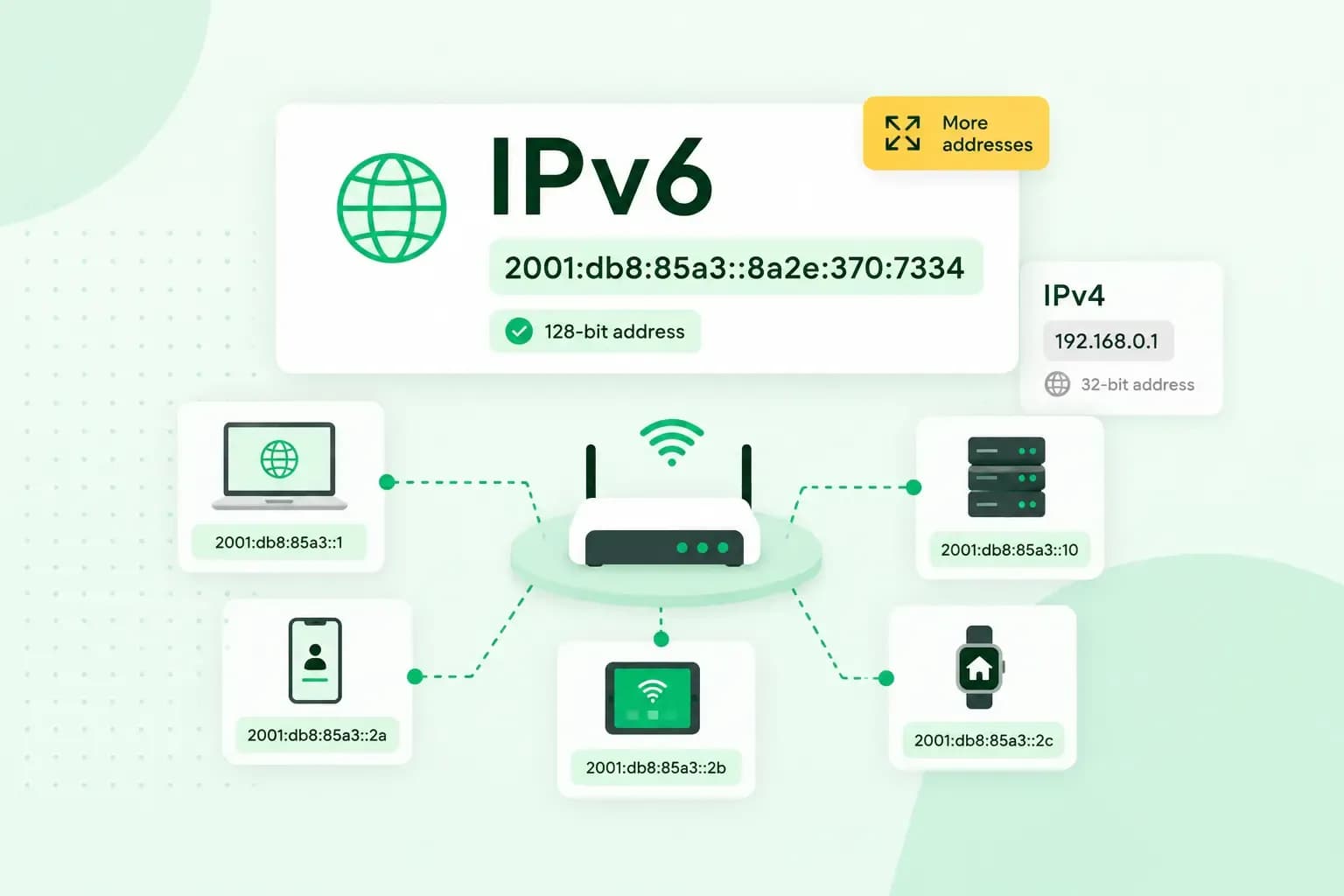
IPv6, short for Internet Protocol version 6, is the newer version of the Internet Protocol, the system that uses addresses to deliver data between devices online. It's designed to replace IPv4 in time. IPv4 has run out of new addresses, but IPv6 addresses are far longer than IPv4's. For you, that means there are enough addresses for every phone, laptop and server to have one of their own.
Every device on the internet needs an IP address, so the data sent to it arrives in the right place, much like a postal address.
Written out in full, an IPv6 address looks like this:
2001:0db8:3c4d:0015:0000:0000:1a2f:1a2bWhy do we need IPv6?
IPv4 doesn't have enough addresses for an internet as large as today's, and IPv6 is the long-term fix. IPv4 addresses are 32 bits long, which allows about 4.3 billion of them.
For years, a technique called network address translation (NAT) has kept IPv4 going. Your router gives the devices at home private addresses, and they share one public address on the internet. It works, but NAT can cause problems for applications built for a direct connection between devices. It was only ever meant as a temporary fix.
The Internet Engineering Task Force (IETF), which develops the technical standards of the internet, first published IPv6 in 1995. It became a full standard in 2017. In Europe, including the UK, IP addresses are handed out by the registry RIPE NCC. It used up its last IPv4 addresses in November 2019, so networks can no longer get new ones from it.
IPv4 vs IPv6: the main differences
Each IPv6 address is much longer than an IPv4 address, which is where all the extra addresses come from.
| IPv4 | IPv6 | |
|---|---|---|
| Address length | 32 bits | 128 bits |
| Number of addresses | About 4.3 billion | About 340 trillion trillion trillion (2 to the power of 128) |
| How it's written | Four groups of decimal digits, separated by dots | Eight groups of hexadecimal digits (0 to 9 and a to f), separated by colons |
| Sharing one public address (NAT) | Widely used | Largely not needed |
IPv6 also lets a device create its own address on a network, without anyone setting it up by hand. This is called stateless address autoconfiguration (SLAAC).
Many networks run both versions side by side, which is called dual stack. A device or a website can then have both an IPv4 and an IPv6 address. IPv4 isn't being switched off, and devices that use it should keep working. In the meantime, many networks that still need IPv4 addresses buy them from other networks or share them.
What an IPv6 address looks like
An IPv6 address is written as eight groups of four hexadecimal digits, separated by colons. Hexadecimal digits include the letters a to f as well as numbers, which is why an IPv6 address mixes letters and numbers.
Two rules make an IPv6 address shorter to write:
- Leave out leading zeros: in each group, you can drop the zeros at the start of the group, as long as one digit is left.
- Replace zero groups with a double colon: one run of groups that are all zeros can be written as
::. You can do this only once in an address.
Take the example address from the start. Dropping the leading zeros turns 0db8 into db8 and 0015 into 15, and the double colon replaces the two groups of 0000. The first line below is the full address and the second its short form:
2001:0db8:3c4d:0015:0000:0000:1a2f:1a2b
2001:db8:3c4d:15::1a2f:1a2b
Do you need to do anything about IPv6?
Not as an everyday user. All major operating systems, including Windows, support IPv6. You shouldn't notice which version your connection uses.
Whether your connection actually uses IPv6 depends on your broadband or mobile provider. For a quick IPv6 test, open test-ipv6.com in your browser. It checks whether you can reach sites over IPv6 alone and over both versions, then tells you what your result means. If it shows you have no IPv6, nothing should change for you. If you'd like IPv6, ask your provider whether they offer it.
IPv6 and your website
For visitors to reach your website over IPv6, the server your site runs on needs an IPv6 address. Our hosting plans include IPv6. Your domain also needs a record that points to that address.
The server side is your host's job. The record sits in your domain's Domain Name System (DNS), the system that sends visitors from your domain to your server. Where an A record points your domain to an IPv4 address, an AAAA record points it to an IPv6 address. To check that your web hosting gives your site an IPv6 address, look for an AAAA record in your domain's DNS settings, or ask your host. If there isn't one yet, visitors should still reach your site over IPv4, just as they do now.
If your site is hosted somewhere else, ask that host for your site's IPv6 address. Then create an AAAA record with that address in our control panel, as long as your domain uses our name servers. If your domain uses another host's name servers, add the record in that host's DNS settings instead, even when the domain is registered with us. A DNS change like this often takes a few hours to reach everyone, and can take up to 72 hours.
Our hosting plans include web space, professional email accounts and an SSL certificate for your site.
See hosting plansGet your website ready for IPv6
With an IPv6 address on its server and an AAAA record on your domain, your site is ready for visitors on IPv4 and IPv6 alike. If you're choosing a new host, the right plan depends on what your site needs, so choose a hosting plan that fits it.
Recommended reading
 Hosting6 Nov 2026
504 Gateway Timeout: what it means and how to fix it
A 504 Gateway Timeout means a server in between got no answer from the website in time. See whose fault a 504 error is and how to fix it, WordPress included. Hosting4 Aug 2026
What is website cache?
What does cache mean? And how to clear your cache? Read the importance of cache and why it's necessary to clear your cache once in a while. Hosting4 Aug 2026
What is SSH?
How does SSH work & what does it do? Learn about the history of Secure Shell's predecessor Telnet and how SSH improved our internet security in this article.