
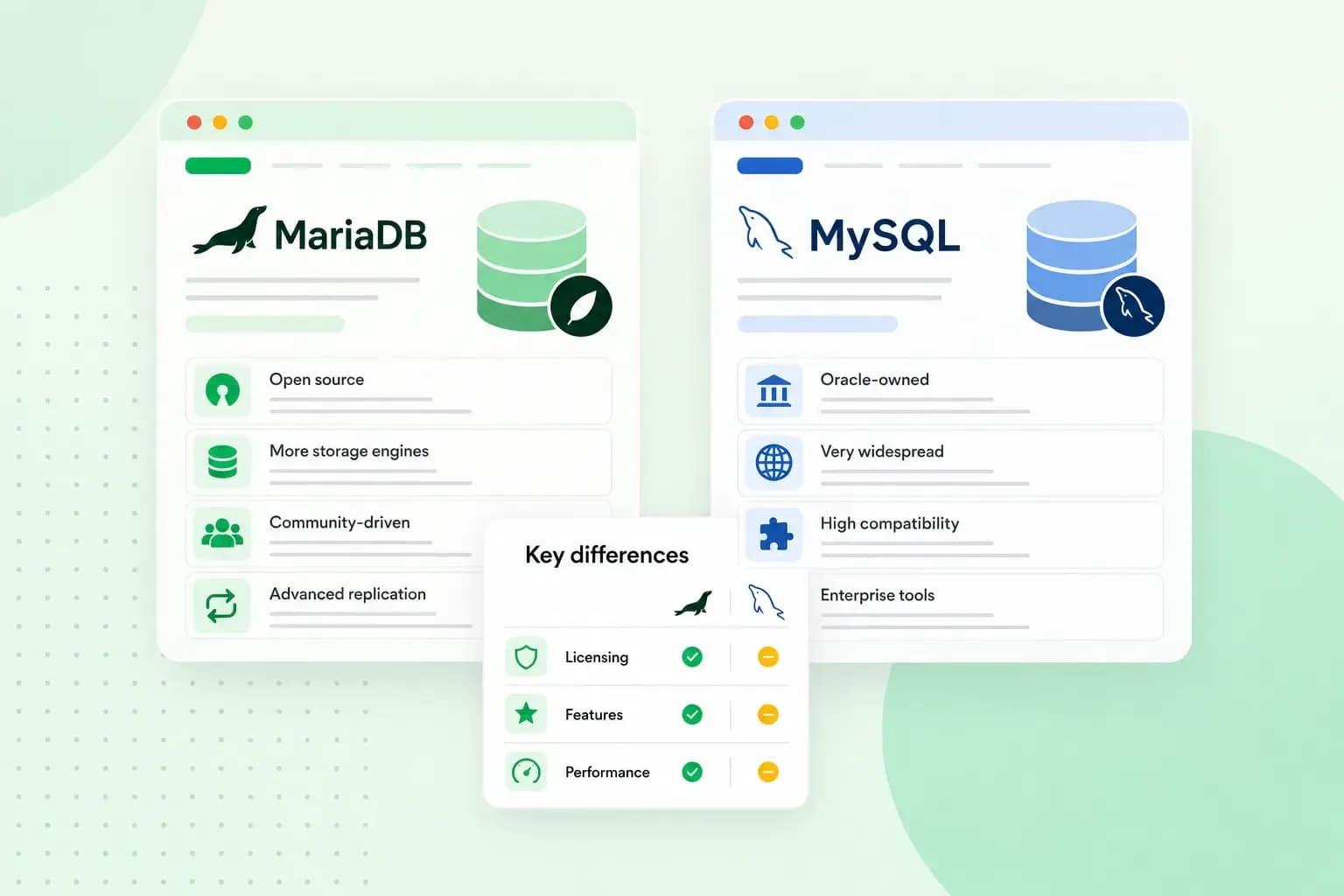
When you compare MariaDB vs MySQL, the main differences are who's behind each database and what it adds. MariaDB started in 2009 as a copy of MySQL, and the two still work in much the same way. Oracle owns MySQL and sells a paid Enterprise Edition with extra features and support. MariaDB is looked after by the MariaDB Foundation, which keeps it open source, and it has extra storage engines built in. For a WordPress website, either one does the job.
The differences matter when you run your own server and choose the database yourself.
Where MySQL and MariaDB come from
MySQL and MariaDB are relational database management systems. They keep your website's content in tables, such as the posts, pages and comments of a WordPress site. To read and change that content, they use SQL (Structured Query Language).
MySQL came first. It's open source under the GNU General Public License (GPL), but Oracle, which owns it today, also sells a commercial licence.
In 2009, Oracle agreed to buy Sun Microsystems, which had bought MySQL the year before. That year, MySQL's founder Michael "Monty" Widenius forked the project. A fork is a copy of a program's source code that then develops on its own. He named the new project MariaDB after his second daughter, Maria, just as MySQL is named after his first daughter, My. Most of MySQL's original developers joined him, according to MariaDB.
Is MariaDB the same as MySQL?
No, but they're close. Up to version 5.5, MariaDB worked as a drop-in replacement for the matching MySQL version. You could swap one for the other, with some limitations. Since then, every new MariaDB version has added features of its own, and the differences keep growing.
A lot still works the same way, and MariaDB says most applications that use MySQL also work with MariaDB. In most cases, MariaDB's data files, file names and paths match those of the matching MySQL version. That usually makes a move from MySQL to MariaDB easy, even to the newer MariaDB versions from 10.0 on.
Before you move an existing site or application, back up its database and check which MariaDB versions its software supports. MariaDB keeps a list of the differences between MariaDB and MySQL for each version, so you can see what works differently in the one you pick.
Differences between MariaDB and MySQL
Both are open source under the GPL, so you can use either one for free. What sets them apart is who looks after each database and what comes on top.
| MariaDB | MySQL | |
|---|---|---|
| Who's behind it | The MariaDB Foundation. Most of its developers work for MariaDB Corporation. | Oracle |
| Licence | GPLv2, and the MariaDB Foundation keeps it open source | GPL, or a commercial licence from Oracle |
| Extra features | Each new version adds features of its own | MySQL Enterprise Edition, a paid edition with extra features, management tools and support |
| Compatibility | Started as a drop-in replacement for MySQL and has moved further away with each version | The original that MariaDB was built from |
| Storage engines | Extra engines such as ColumnStore and Aria, on top of the standard ones | InnoDB and the other standard engines |
A storage engine is the part of the database that stores your tables and reads them back. The standard engines, such as InnoDB, are what a typical website runs on. MariaDB's extra engines are built for special jobs, so they matter mainly for bigger or specialised projects.
Is MariaDB faster than MySQL?
Not in a way you can count on for your own site. How fast a database runs depends a lot on how the server is tuned for its workload. So a MariaDB vs MySQL performance benchmark run on someone else's data says little about your website. If speed really matters, test both with your own data. For most websites, it's worth looking at your hosting and caching first.
MariaDB or MySQL: which should you choose?
Choose the one your software supports and that you're happy to look after. You make this choice on a server you run yourself, such as a VPS (virtual private server), where you decide which software runs. Our VPS is unmanaged, so you also install, update and secure the database yourself.
MariaDB suits you if you're starting fresh and want a database whose foundation keeps it open source, or if your project needs one of its extra storage engines. Because the two move further apart with each version, software written for a recent MySQL version may need checking first.
MySQL is the natural pick if your software is made for it, or if you want the advanced features and technical support of Oracle's paid Enterprise Edition.
Our advice: if your software supports both, MariaDB is a sensible default for a website, since it stays open source and WordPress supports it. Choose MySQL when you need Oracle's support or a feature only MySQL has.
MariaDB vs MySQL for WordPress
WordPress works with both. It recommends MariaDB 10.11 or MySQL 8.0 or higher, so what matters is the version rather than the name.
On shared hosting, you don't choose the database. You use the one your host provides, so check that its version meets that bar. Our web hosting plans include MariaDB databases, and you can run WordPress on any of them. If your software needs MySQL itself, a VPS lets you install it.
With our web hosting, your MariaDB database, phpMyAdmin and a one-click WordPress installer are ready from the start.
See hosting plansTo work in the database directly, you use phpMyAdmin, an open source tool that comes with our web hosting. You can log in to phpMyAdmin from the control panel to import, export or optimise tables. Changes made there cannot be undone, so take care when you work in it. Make a backup of the database first by exporting a copy in phpMyAdmin, so you can import it again if something goes wrong. Our backups of your databases are made daily and kept for up to 14 days, so on our Professional, Business and Max plans, which let you restore them, they can be a second way back. If your plan only includes backups, you can still see them but need to upgrade to restore one.
What to do next
For a WordPress site, the database comes with your hosting, so the next step is to choose a web hosting plan and install WordPress. Once WordPress is installed, our guide shows you how to use WordPress.
Recommended reading
 Hosting4 Aug 2026
What is website cache?
What does cache mean? And how to clear your cache? Read the importance of cache and why it's necessary to clear your cache once in a while. Hosting4 Aug 2026
What is SSH?
How does SSH work & what does it do? Learn about the history of Secure Shell's predecessor Telnet and how SSH improved our internet security in this article. Hosting4 Aug 2026
What is a CMS (content management system)?
You can easily create and manage your website with a content management system (CMS). Want to know more? Learn all about CMS in this complete guide!